Small Business Project Management
at One Flat Price
Per-seat fees, admin consoles, and features the team never opens add cost without adding work done. Thicket is for a business that needs the whole team, and its clients, working in one place at one price.
$49/month flat for unlimited users, instead of $10 to $14 per user, per month.
Free plan and a 30-day Pro trial. No credit card required.
What Is the Best Project Management Software for a Small Business?
The best project management software for a small business is the one your whole team actually uses, at a price that does not grow with every hire. In practice that means a small set of tools everyone already understands (to-dos, a message board, docs and files, a schedule, a kanban board, and chat), room for clients and contractors without extra fees, and a bill you can budget a year ahead. Thicket is built to be exactly that: six tools in every project, client access included, at $49/month flat for unlimited users.
The whole team uses it
Six familiar tools, nothing to configure. If your team can use email, they can use Thicket on day one.
The price stays put
$49/mo flat for unlimited users, or $39/mo billed annually. Hiring never raises the bill.
Clients are included
Invite clients into their project with scoped access and approvals. No guest seats, no viewer tiers.
Quick facts
Small business project management, in one screen
Thicket is flat-rate project management software. Six tools in every project, client access included, and a price that never grows with headcount.
- Price
- $49/mo flat (or $39/mo annual), unlimited users
- Free plan
- 1 project, 20 people, 1 GB, no card
- Trial
- 30-day Pro trial, no credit card required
- Best for
- Businesses that want the whole team, clients included, in one tool
- Six tools per project: message board, to-dos, docs & files, schedule, boards, chat
- Client access with approvals is included, so client work needs no second system
- Per-seat competitors charge $10 to $14/user/mo on entry tiers, so a 10-person business pays $100 to $140/mo
Per-Seat Pricing Taxes Every Hire You Make
A small business grows in people: a new hire, a contractor for the busy season, a client who wants to follow along. On per-seat tools each of them is a line on next month's bill. Here is the entry paid tier of the popular tools, billed monthly, as your headcount grows.
| People | ThicketPro, flat rate | Monday.comStandard · $14/user | AsanaStarter · $13.49/user | ClickUpUnlimited · $10/user | NotionPlus · $12/user |
|---|---|---|---|---|---|
| 5 people | $49/mo | $70/mo | $67.45/mo | $50/mo | $60/mo |
| 10 people | $49/mo | $140/mo | $134.9/mo | $100/mo | $120/mo |
| 20 people | $49/mo | $280/mo | $269.8/mo | $200/mo | $240/mo |
Per-seat rates are each vendor's entry paid tier billed monthly, from their public pricing pages (verified June 2026). Basecamp switched to flat project-tiered pricing in mid-2026: $25 to $299/mo by active-project count (its unlimited tier is billed annually only).
$49/month at 5 people. $49/month at 50.
See the full pricing or compare Thicket to the big tools.
Six Tools That Cover How a Small Business Actually Works
Every project comes with the same six tools, working the moment you sign up. No modules to buy, no setup project, no admin to appoint.
Plus automatic check-ins, project health charts, templates, @-mentions, and a documented API, all in the one flat price.
Built for a Business, Not Just a Backlog
Small businesses do not just track tasks. They serve clients, juggle part-timers and contractors, and need to know what is on track without a status meeting. That is the work Thicket is shaped around.
Do client work all day? The client access page walks through the whole invite, share, and approve workflow.
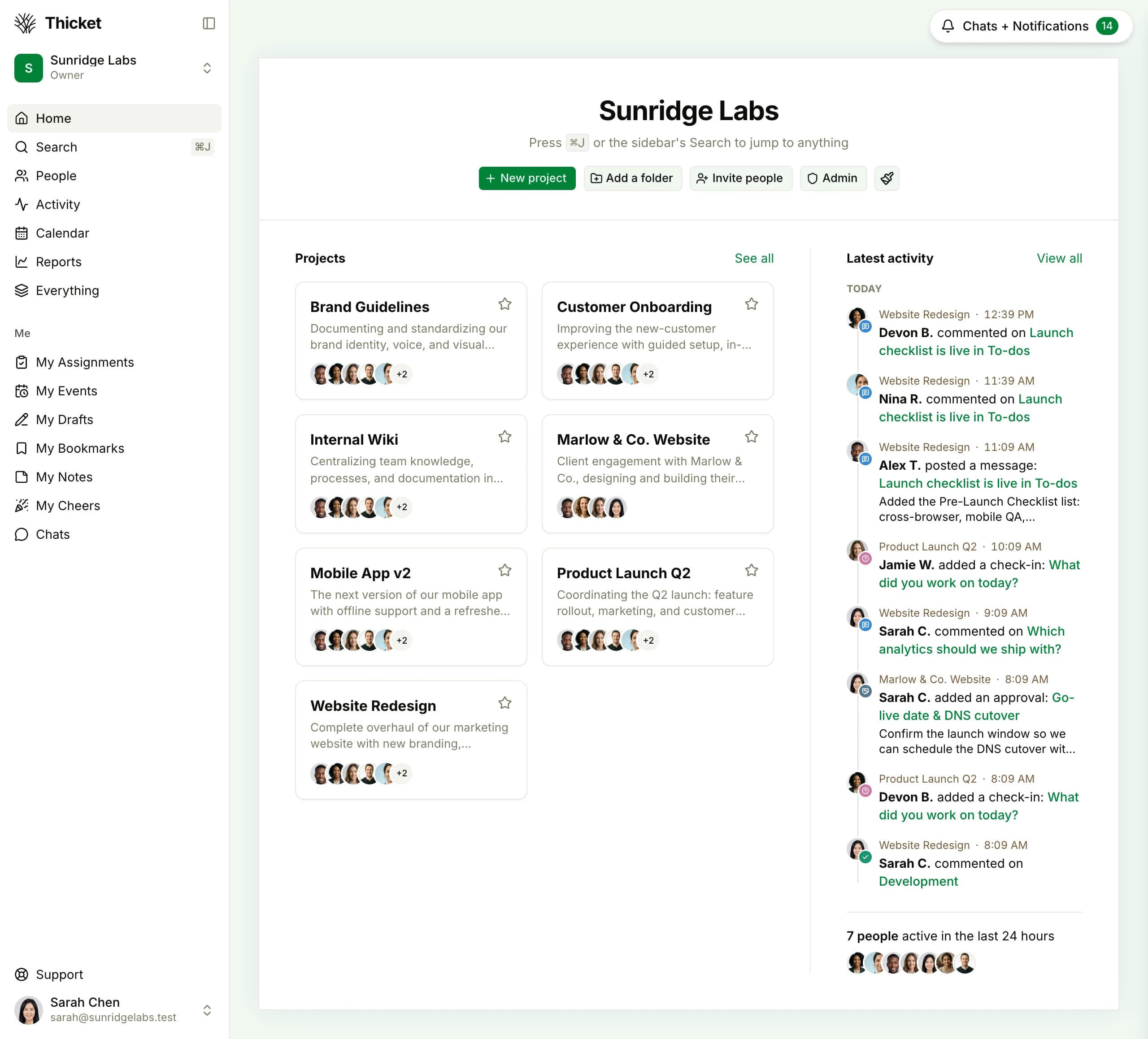
Every Project in the Business, on One Screen
Client engagements, internal operations, and the season's big push, side by side. Anyone you add sees the projects they belong in and nothing else.
What Thicket Gives Your Business
- Run the whole business, team and clients, in one tool
- Pay one flat price that never grows with headcount
- Have everyone productive on day one, with no training or setup project
- Give clients scoped access and collect approvals without buying seats
- Stop stitching together chat, tasks, docs, and calendar subscriptions
Weighing a specific tool? See the product comparisons: Basecamp, ClickUp, Trello, and all tools side by side.
Project management sized for your business
Start free, add the whole team, and run one real project through it. You will know inside a week whether it fits, and it will not cost you a card number to find out.
Free plan to start, no credit card. Cancel anytime, no questions asked.
$49/month flat, unlimited users, clients and contractors included
Six tools in every project, working on day one
Free plan: 1 project, 20 people, 1 GB
30-day Pro trial, no credit card required
Small Business Project Management, Answered
How should a small business choose project management software?
Ask three questions. First: will the whole team actually use it? A tool only the manager opens is a status-report generator, not project management. Second: does the price stay predictable as you hire? Per-seat tools charge $10 to $14 per user per month on their entry tiers, so the bill grows with every hire, contractor, and client you add. Third: does it cover the work your business actually does? For most small businesses that means to-dos, a message board, docs and files, a schedule, a kanban board, and chat, plus a way to let clients in. Thicket is built around exactly those three answers, at $49/month flat for unlimited users.
What is the best project management tool for a team of 5 to 10 people?
The best tool is the one your whole team will keep using. If your team runs on to-dos, discussions, docs, a schedule, boards, and chat, Thicket covers all six in every project at $49/month flat, so a 5-person team and a 10-person team pay exactly the same.
What should a small business budget for project management software?
On per-seat tools, entry paid tiers run $10 to $14 per user per month billed monthly, so a 10-person business budgets roughly $100 to $140/month, and the number climbs every time you hire. On flat-rate pricing the budget line is fixed: Thicket is $49/month for unlimited users, or $39/month billed annually ($468/year). Clients and contractors are included, so there is no hidden guest-seat math.
Do clients and contractors count as users in Thicket?
No. Pro is $49/month flat for unlimited people: employees, contractors, and clients alike. Client access is built in, so you can give a client a scoped view of their project and collect approvals without buying them a seat. On the Free plan, the 20-person limit is one shared pool that clients count within.
Can we try Thicket before paying?
Yes, two ways. The Free plan is a real plan, not an expiring trial: 1 project, 20 people (clients included), and 1 GB of storage. Accounts created on thickethq.com also get a 30-day Pro trial with no credit card required, so you can run a real project with unlimited people before deciding.
Your business, one workspace, one price
$49/month flat for unlimited users. Six tools, clients included, nothing to configure. Start free and run a real project through it.