Project Management With Client Access
Clients Included, No Per-Seat Fees
If you do client work, you need to give clients a window into their project (progress to follow, deliverables to review, work to approve) without exposing everything else. Thicket's client access does exactly that: invite a client, share exactly what they should see, and collect approvals on the record.
And every client is included in the flat $49/month. No guest seats, no viewer tiers, no per-person math.
Free plan. No card required. Includes a 30-day Pro trial.
Give a Client Access in Four Steps
There's no bolt-on portal to configure and maintain. Client access is one switch on any project: flip Work with clients on the project's People page, and the whole workflow is right there.
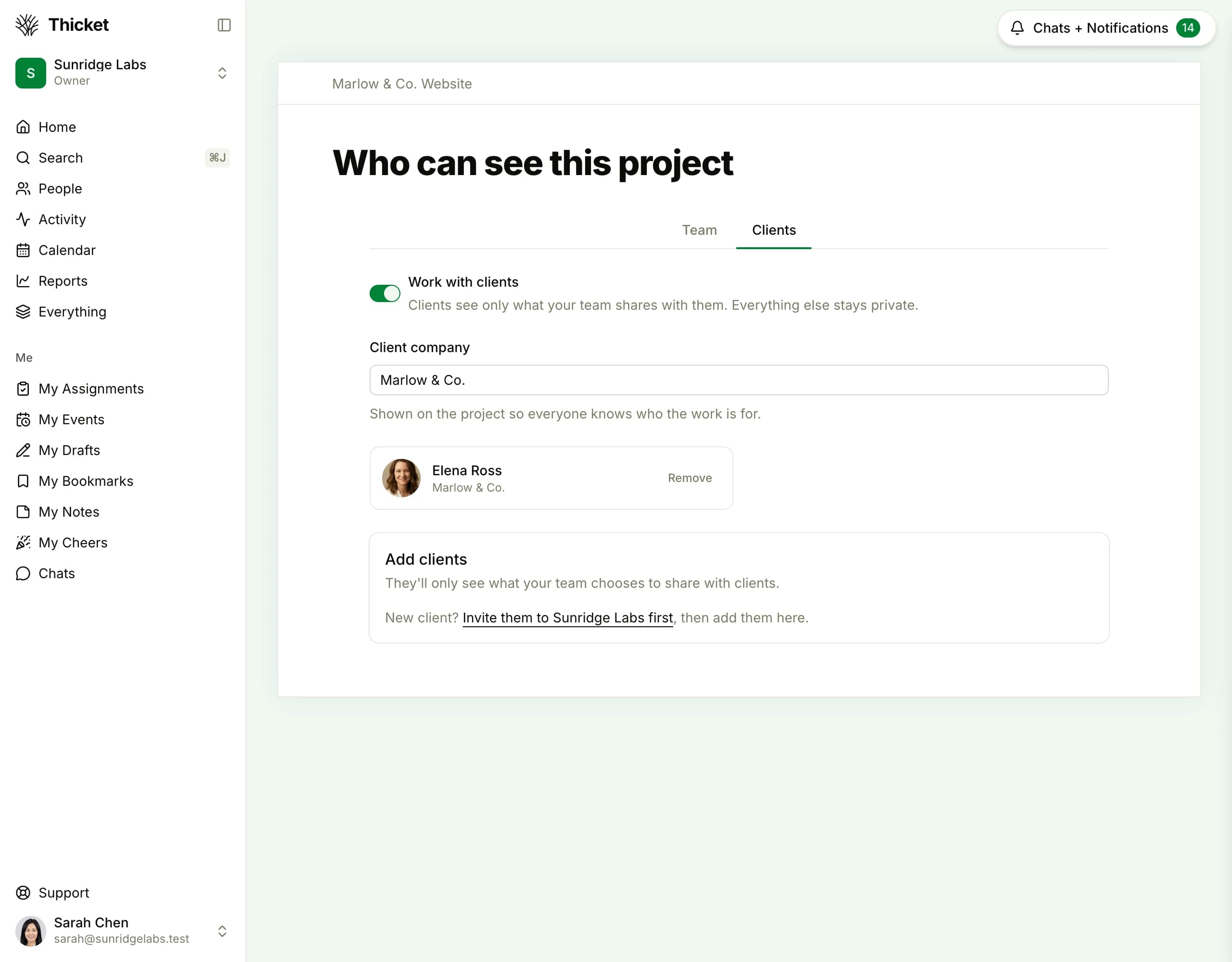
The whole setup, on one page: flip Work with clients, name the client company, add your client. Turning it off later shows you exactly what happens before anything changes.
Your Client Sees Their Project, and Only Their Project
Signed in, your client sees just the one project you invited them to: the deliverables, docs, and schedule you've shared, and a running activity feed. Your other projects, and anything you keep internal, never appear.
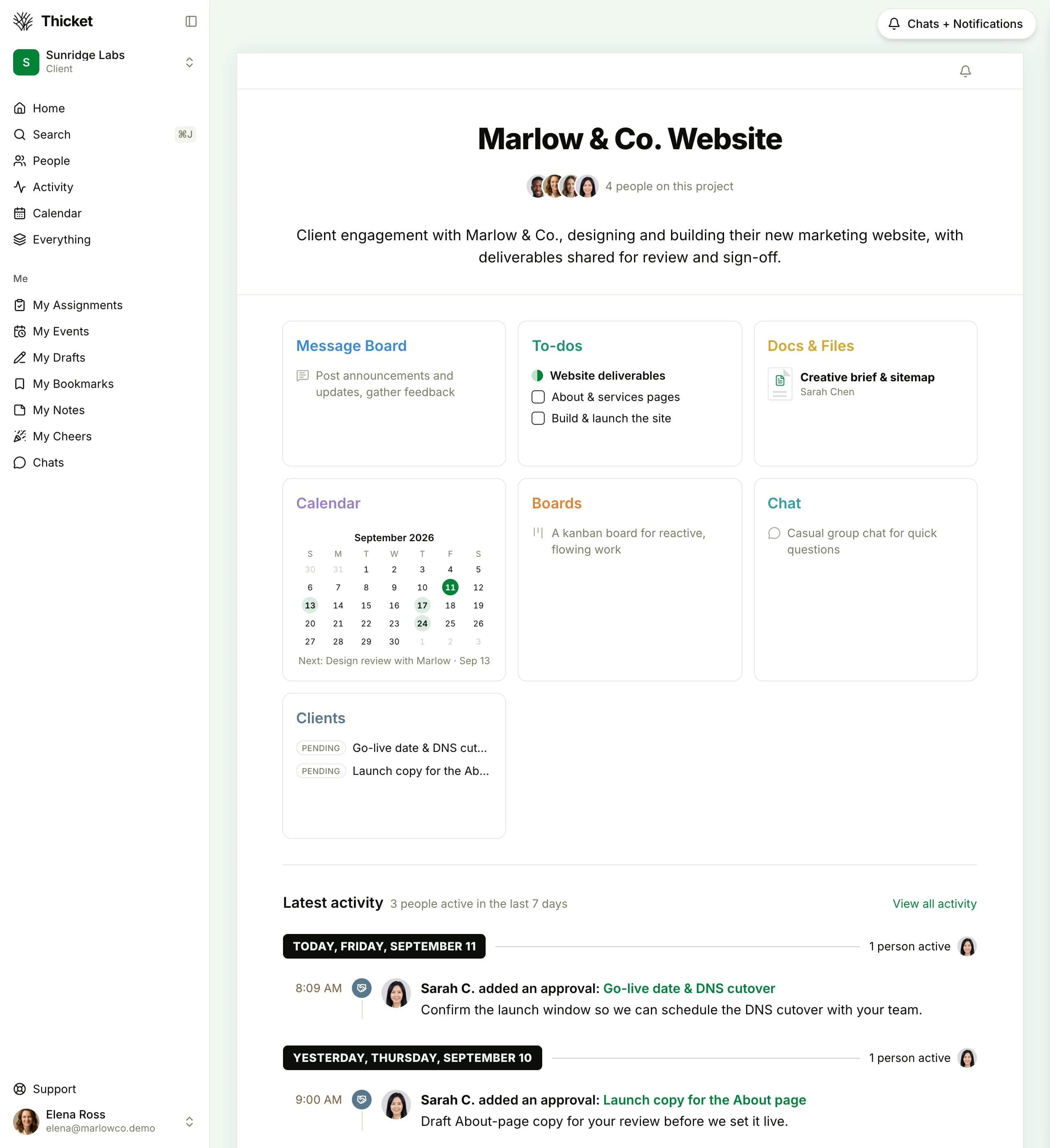
The client's own view. Their account sees only the one project they were invited to, with the shared deliverables, docs, and schedule and a live activity feed. Every other project stays out of sight.
Clients See Only What You Share
Sharing is opt-in, item by item. Nothing is client-visible until you say so, and you never have to guess what's shared: every page in a client project has a band under its title bar that says who can see it, with your client's actual company name. Click Change in the band to decide, right from the page.
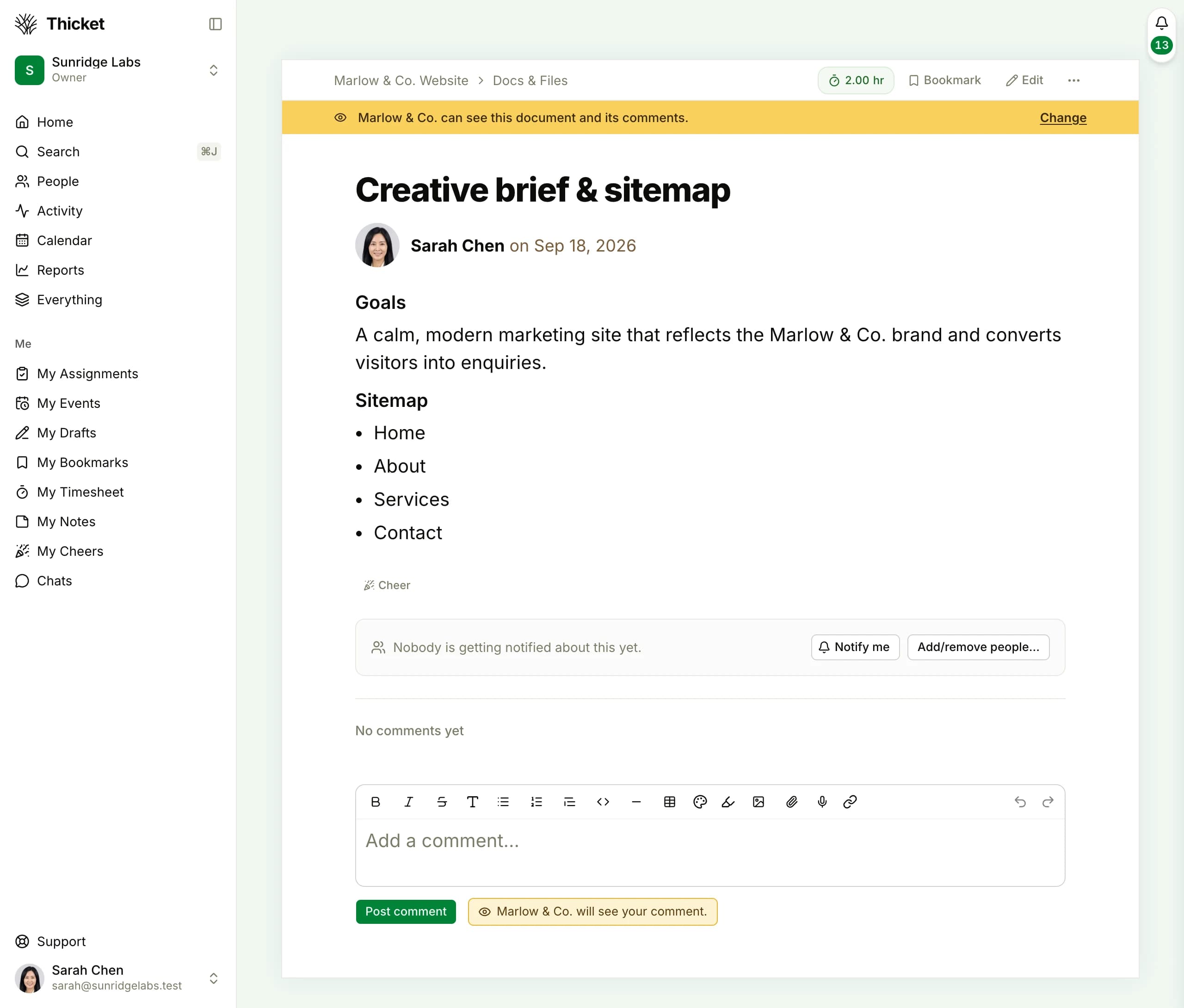
A shared brief, as your team sees it: the band under the title bar reads “Marlow & Co. can see this document and its comments.” A team-only page says “Only your team can see this document.” Your client never sees the bands. Their view just looks clean.
| In a client project | Client can see it | How |
|---|---|---|
| To-dos and their progress | If you share it | Mark a to-do list client-visible |
| Docs, briefs, and files | If you share it | Share deliverables for review |
| Schedule dates and milestones | If you share it | Keep clients on the timeline |
| Approvals and sign-off requests | If you share it | Client is the named approver |
| Client correspondence thread | If you share it | On-the-record conversation |
| Internal message board threads | Internal | Private unless you share |
| Team group chat | Internal | Private unless you share the whole room |
| Your other projects | Internal | Scoped to their project only |
| The sharing controls themselves | Internal | Clients never see the bands or pills |
Only items you explicitly mark visible to clients appear in their view. Your other projects are never visible to a client added to this one.
Turn “Looks Good” Into a Recorded Sign-Off
Client approval usually lives in email, where it's vague, scattered, and impossible to point back to. In Thicket you request sign-off on the work itself, and the client makes a clear decision logged with their name and the date. The screenshot below is the client's own view. Their whole workspace is this one project.
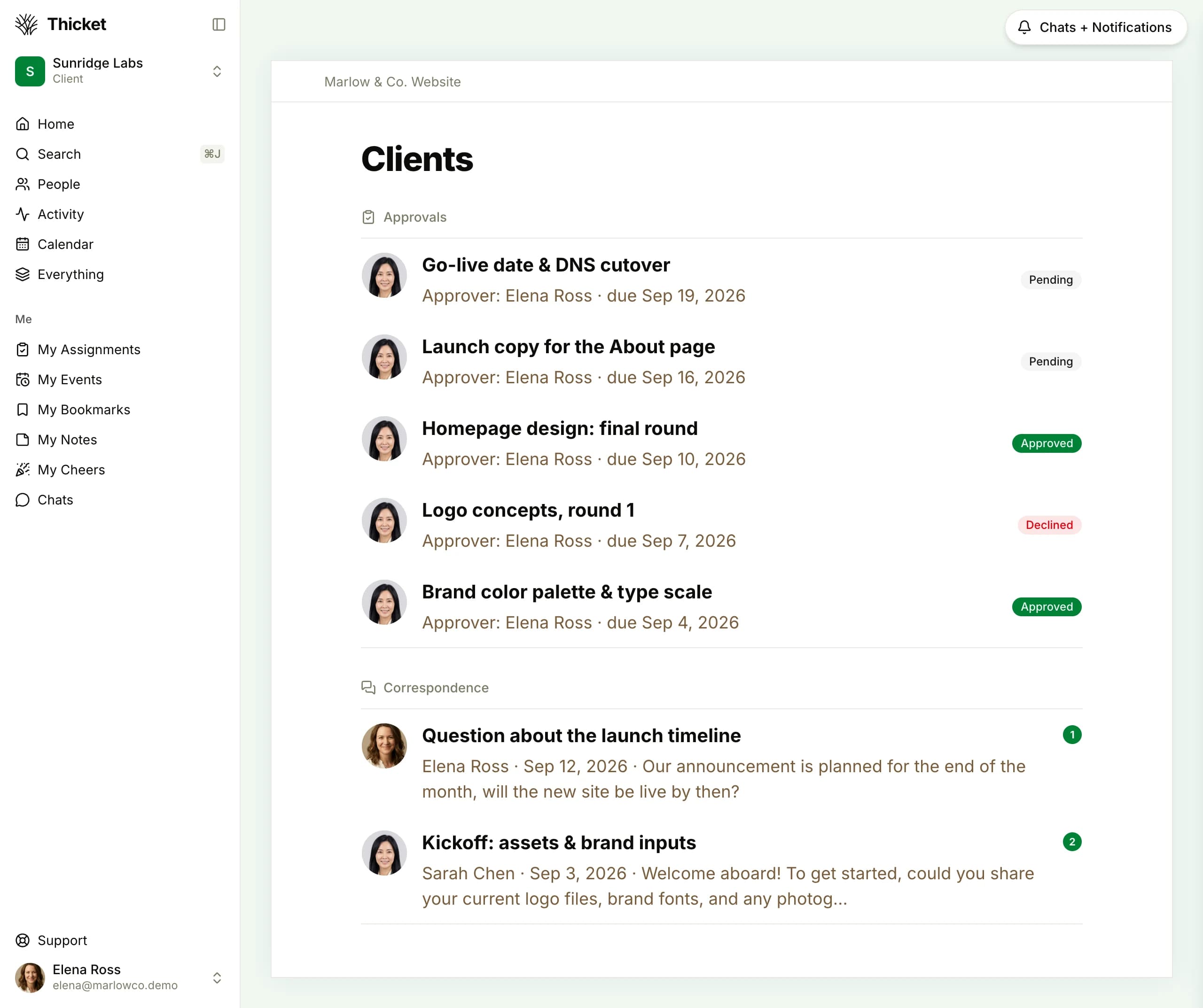
The client's own view, signed in as the client. Note the Client badge in the sidebar. They get only the one project they were invited to, not the studio's other work, with their approvals and correspondence. Scoping is enforced for real, not staged.
Why Client Work Punishes Per-Seat Pricing
Per-seat tools price by the person. Free “guest” or “viewer” access, where it exists, is often limited. The moment a client needs to comment on work or approve a deliverable, that's typically a paid seat. Count your team and your clients together and the gap is stark.
| Team + clients | Thicket | Monday.comStandard · $14/user | AsanaStarter · $13.49/user | ClickUpUnlimited · $10/user | NotionPlus · $12/user |
|---|---|---|---|---|---|
| 5 people | $49/mo | $70/mo | $67.45/mo | $50/mo | $60/mo |
| 10 people | $49/mo | $140/mo | $134.9/mo | $100/mo | $120/mo |
| 20 people | $49/mo | $280/mo | $269.8/mo | $200/mo | $240/mo |
$49/mo
flat, whether it's 3 clients or 30
$2,772/yr
saved at 20 people vs Monday.com Standard
$0
extra per client you invite
Thicket Pro is $49/month flat ($39/month billed annually). Per-seat figures are each tool's entry paid tier at monthly billing, from their public pricing pages (verified June 2026). At 20 people that's $280/mo on Monday.com or $269.80/mo on Asana versus $49 flat. Basecamp prices flat too these days, tiered by project count: unlimited projects there costs $299/mo billed annually, versus $49 on Thicket.
Everything Client Work Needs, In One Project
Client access sits on top of the same six tools your team already works in, so sharing with a client is a toggle, not a second system to keep in sync.
What Thicket's client access gives you
- Give clients a scoped view of their project without paying per seat
- Collect approvals and keep decisions on the record
- Keep client-facing and internal conversation cleanly separate
- Run client work on the same simple tools your team already uses
- Stop doing per-seat math every time you add a client
Give every client a window in without paying per seat
Invite a client, share exactly what they should see, and collect approvals on the record. Thicket is $49/month flat, with every client and team member included.
Free plan. No card required. Includes a 30-day Pro trial.
$49/month flat: unlimited team members and clients
Scoped client access: clients see only what you share
Approvals on the record: pending, approved, or declined
Free plan: clients count within its 20 people. Invite one on your first project
Common Questions About Client Access
What is client access in Thicket, and how does the client portal work?
Client access lets you invite a client into a specific project as a client member. Flip "Work with clients" on the project's People page, add the client company's name, and invite them. They get their own login and see only what you've shared in that project: the to-dos, docs, files, schedule dates, and message threads you mark client-visible, plus any approvals you request and a correspondence thread for on-the-record conversation. It's scoped access inside Thicket, not a separate app to run.
Do clients count as paid seats?
No. Thicket is $49/month flat for unlimited people: your whole team and every client included. There are no per-seat fees, guest seats, or viewer tiers. The Free plan's 20 people can be any mix of teammates and clients to try it; Pro removes those limits. On per-seat tools, every collaborator who needs to comment on work or approve a deliverable is typically another $10–15 per month.
What can clients see, and what stays private?
Clients see only what you explicitly share. A client must be added to a project, and inside it they see just the items marked visible to clients: nothing from your other projects, and nothing internal by default. You're never guessing, either. In a client project, every page has a band under its title bar, "Only your team can see this" or "[Your client's company] can see this", and Change in the band decides who can see the item on the spot. Preview as client shows your team the project exactly as the client sees it. Your team's internal message board threads, to-dos, chat, and docs stay private unless you choose to share them. Clients never see the sharing controls at all, so their view just looks clean.
Can clients approve work in Thicket?
Yes. From a project's Clients tool you request an approval: give it a title, describe what needs sign-off, pick the client as the approver, and optionally set a due date. The client gets a clear approve-or-decline decision, and the status is recorded as pending, approved, or declined, so everyone can see who signed off on what and when. No email chains, no ambiguous "looks good."
How do clients log in, and can we remove them later?
You invite a client by email from the project; they get a link to join and set up their own login. From then on they see only the projects they've been added to. Removing a client's access is a click, and because pricing is flat, adding or removing clients never changes your bill.
Can clients comment and message us inside the project?
Yes. Clients can comment on the work you've shared, and each project has a correspondence thread for on-the-record client conversation, so questions and decisions live with the project instead of scattered across inboxes. Your team keeps its own internal message board and group chat that clients never see, so you can talk freely while the client sees a clean, professional view.
Which businesses is client access built for?
Any business that does client work and wants to give clients a window in without buying them seats: studios, consultancies, freelancers, bookkeepers, fractional operators, and independent service providers. If you specifically run a design, marketing, or dev agency, our project management for agencies page covers the agency-economics angle; this page is about the client-access workflow itself.
Is there a free plan to try client access first?
Yes. The Free plan includes 1 project, 20 people (teammates and clients alike), and 1 GB storage: enough to invite a real client and run one project end to end, approvals and all. When you're ready, Pro is $49/month (or $39/month billed annually, $468/year) with unlimited projects, team members, and clients, plus 50 GB storage and a 30-day trial. No credit card required to start.
Your clients shouldn't cost you a seat each
$49/month flat. Unlimited team members and clients. Scoped access, approvals on the record, and internal work kept private. Start free. No credit card required.