Your AI agent can work in Thicket
Connect ChatGPT or another compatible AI app with Thicket's MCP connector, or give an agent the REST API or CLI. It works with your permissions and is included on every plan.
The no-shell path for ChatGPT and compatible AI apps
The command line, for you or any agent with a shell
TypeScript client and the OpenAPI spec, for your own apps
Every route on one page, plus a skill file for agents
Free plan available. No credit card required.
Quick facts
Thicket for AI agents, in plain terms
Thicket gives AI apps two clear paths: connect through the remote MCP connector with browser approval, or use the REST API and CLI with a personal access token. MCP is included on every plan and follows the permissions of the person who connects it.
- Agent access
- ChatGPT, Claude Code, and compatible remote MCP clients can use a curated 38-tool connector. The versioned REST API and official CLI expose the fuller product surface for agents that run code or shell commands. An admin can also add an agent as a member of the team: people @mention it and assign it work, and it replies as itself.
- Authentication
- MCP uses OAuth browser approval, with read-only and read-and-write access shown before you connect. API and CLI agents use revocable personal access tokens, with a read-only option.
- What it costs
- Nothing extra. MCP, the API, and the CLI are included on Free, Starter, and Pro. Pro is $49/month flat with unlimited people.
- Built-in AI
- None, on purpose. Thicket ships no built-in AI features. You choose the external app and control its access.
- JSON everywhere: snake_case keys, no response envelope, consistent error objects.
- One content model: messages, to-dos, docs, files, cards, and chat lines share a single recording lifecycle.
- Organization-level isolation enforced in the database with row-level security.
- Roles scope what an agent sees: member for teammates, client for view-limited outsiders.
- Machine-readable site guide at thickethq.com/llms.txt.
What an agent can do in a project
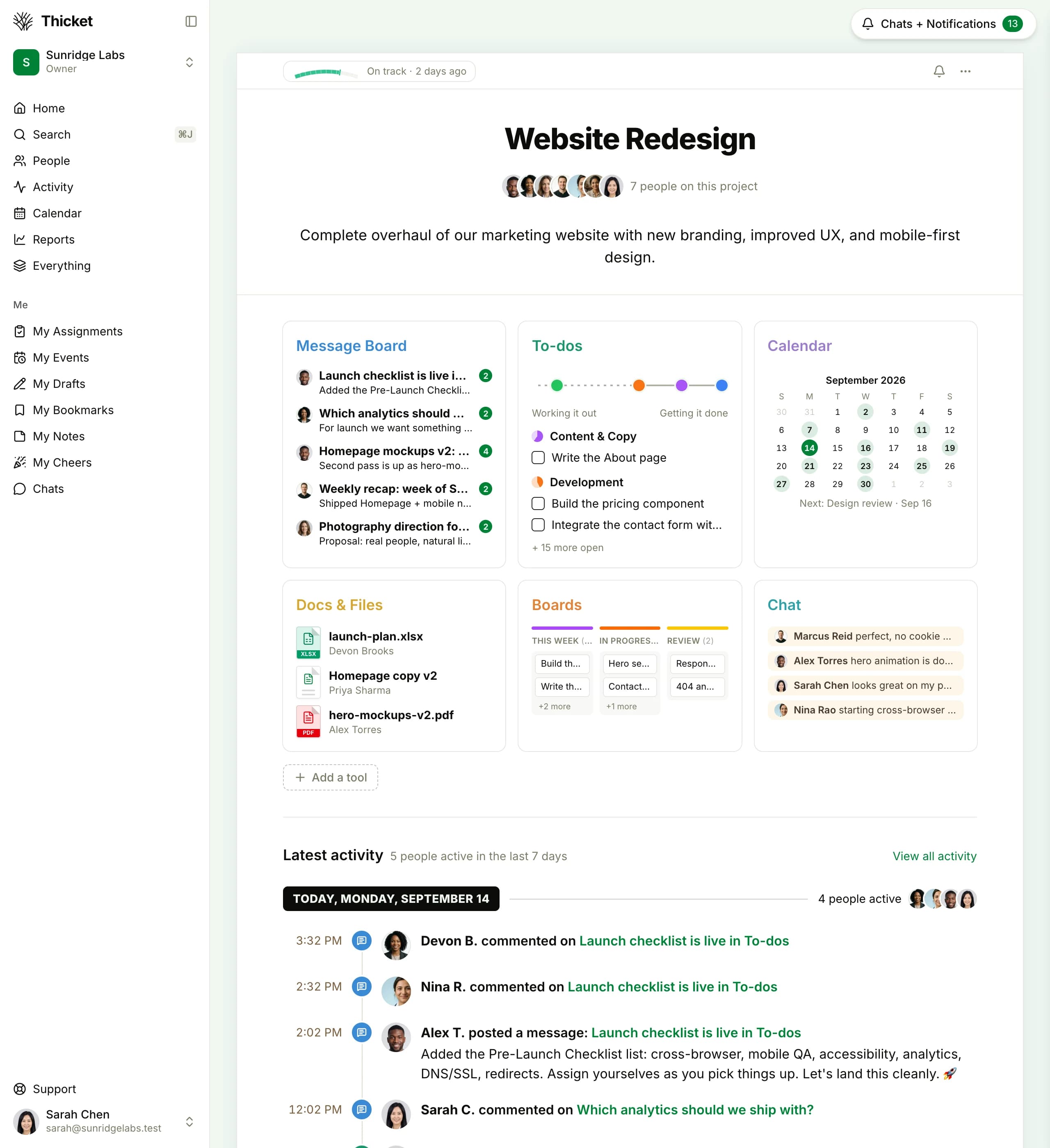
Every Thicket project has a message board, to-dos, docs and files, a schedule, boards, and chat. An agent reaches all of them through the same API the app runs on.
Post and read updates
Write the weekly summary on the message board, publish meeting notes, or read every thread it has access to and report back.
Work the to-do lists
Create lists and to-dos, assign people, set due dates, and check things off. Recurring to-dos keep the routine chores rolling.
Keep docs and files current
Write rich documents, upload files, and replace a file with a new version while the comments and subscribers carry over.
Move work across the board
Kanban cards move between columns with one position update, so an agent can triage incoming work or clear a done column.
Run the schedule
Create events with recurrence and reminders, read what's due this week, and shift dates when a project slips.
Answer and digest check-ins
Post its own answer to a recurring question, or read everyone else's answers and turn them into a digest.
Search and report
Full-text search across everything the agent can access, plus ready-made reports: overdue to-dos in lateness buckets, upcoming schedule items, each person's open assignments, and the account-wide activity timeline. An agent can answer "where are we?" without you assembling anything.
One install away from any shell
The thicket CLI puts the whole API behind plain commands: styled output for people, JSON with suggested next commands for agents, and a machine-readable catalog so an agent can discover every command without documentation. It works with any agent that can run shell commands: Claude, Codex, Copilot, Gemini.
npm install -g thicket-cli
thicket auth login          # approve in your browser; no password touches the CLI
thicket todos --in "Launch" # a project's open to-dos
thicket todo "Ship it" --in Launch --due friday --assignee me
thicket commands --json     # the full catalog, machine-readable
Open source at github.com/thicket-hq/thicket-cli. A bundled skill file teaches any agent the commands: thicket skill prints it, ready to hand to whichever agent you use.
Connect ChatGPT and AI apps with MCP
Thicket also runs a remote MCP connector, live today for ChatGPT, Claude Code, and compatible remote MCP clients. Add the connector URL, sign in to Thicket in your browser, and review whether the app requested read-only or read-and-write access. Once approved, it can list projects, work to-do lists, post messages and comments, read docs, move board cards, follow the schedule, and search.
https://www.thickethq.com/api/mcpThe connection works as you: your organizations, your project access, your role, nothing more. Every change it makes shows up under your name in the project timeline. Disconnect it any time from My settings under Connected apps; its next request is refused. Clients that prefer a header instead of OAuth can send a personal access token as a Bearer header to the same endpoint. Verified end to end with ChatGPT, Claude Code, and the MCP Inspector; the setup guide lives in Thicket Help.
Mention an agent the way you mention a teammate
An owner or admin adds an AI agent under Admin, AI agents, names it, chooses who may direct it, and mints its token. From then on it is a member of the team: @mention it in a comment, assign it a card, cheer what it did. It replies under its own name with a small Agent tag, and it never signs in or takes a seat.
Directed by its operators
Only the people you name can put the agent to work. A mention or assignment from anyone else reaches it as context, never as an instruction, and Thicket marks the difference on every inbox row.
It connects out
The agent reads its own inbox over the API, or holds a live stream open, and acknowledges with a cheer within seconds. No webhook, no tunnel, no public endpoint on your machine.
Runs where your code is
The CLI ships the watcher and a Claude Code skill: mention the agent on a card, and a coding agent on your laptop picks it up, does the work in the right repo, and replies on the same card.
thicket auth login --with-token   # the token from Admin, AI agents
thicket agent watch --project "Website"   # corroborated events, one per line
Every post the agent makes carries its byline and the channel it came through, so nobody mistakes its words for a person's. Rotate or revoke its token any time; deactivating it keeps its past work under its name.
A working session, in four calls
Prefer nothing installed at all? This is the real surface, not pseudocode: any agent that can make HTTP requests can do this today with curl and a personal access token.
# 1. A personal access token from My settings authenticates everything
export THICKET_TOKEN=thicket_pat_...
auth='Authorization: Bearer '"$THICKET_TOKEN"
ua='AcmeAgent (you@yourteam.com)'

# 2. Find the project's tools (each tool has a container id)
curl -H "$auth" -A "$ua" \
  https://www.thickethq.com/api/v1/acme/projects/$PROJECT_ID/tools

# 3. Post a status update to the message board
curl -H "$auth" -A "$ua" -X POST \
  https://www.thickethq.com/api/v1/acme/recordings/$BOARD_ID/children \
  -H "Content-Type: application/json" \
  -d '{"type": "message", "title": "Week 33 summary", "content": "..."}'

# 4. Check off a finished to-do
curl -H "$auth" -A "$ua" -X PUT \
  https://www.thickethq.com/api/v1/acme/recordings/$TODO_ID/completion
The full reference, with every route, lives at thickethq.com/developers/api. It's one page: an agent can read the whole thing in a single pass.
Why agents do well here
One content model, few special cases. Messages, to-dos, documents, files, board cards, and chat lines are all recordings: one lifecycle, one comment system, one way to move things. An agent that learns the pattern once can operate the whole product, instead of memorizing a different API for every feature.
The API can't drift from the product. The web app is built on the same service layer and the same routes. There is no separate integration surface that lags a release behind; if a feature ships, its API shipped with it.
Predictable JSON, specific errors. snake_case keys, no envelope, and a consistent error object. A 402 tells an agent it hit a plan limit, a 422 tells it what to fix, and a 404 means the thing isn't there or isn't yours. Nothing to guess at.
Every path keeps identity clear. MCP changes appear under the person who approved the connection, and the MCP tool set has no deletion tools. A dedicated API agent can use its own account, so its work has its own timeline identity; anything that account trashes can be restored for 30 days.
Tenancy is enforced below the code. Every request runs against row-level security in the database. An agent's session in your organization returns nothing from anyone else's, the same guarantee your own session has.
Agents don't change the math
Per-seat tools have an awkward question coming: is an agent a seat? An MCP connection does not create one: it uses the account of the person who approves it and is included on every plan. If you want a dedicated API agent account, Pro is $49/month for the whole organization with unlimited people.
Point an agent at Thicket today
- 1
Choose MCP or a dedicated API account
For ChatGPT, Claude Code, and compatible MCP clients, add the connector URL and approve access from your own account. For a long-running API agent with its own identity, invite something like agent@yourteam.com; normal plan limits apply, and Pro includes unlimited people.
- 2
Scope what it can reach
MCP follows the approving person's organizations, project access, and role. A dedicated API account can be added only to the projects it should reach and can use the client role for view-limited access.
- 3
Hand it the reference
MCP clients need only https://www.thickethq.com/api/mcp and browser approval. Agents that run code or shell commands can use the skill file at thickethq.com/thicket-SKILL.md with a personal access token.
- 4
Watch it work
Review MCP connections under My settings → Connected apps, including their access and last use. Changes appear in the project timeline, and disconnecting stops the app on its next request.
No AI inside, on purpose
There's no chatbot docked in the corner of Thicket, no AI summary button, no credits meter. That's a decision, not a gap. You bring the external app you already trust, including ChatGPT or Claude Code, and decide what it can reach.
So we spend our effort on a clean data model, an API that covers the whole product, and a workspace calm enough that both people and agents can find what they need. When AI helps your team, it connects through an approved MCP connection or a revocable API credential, and you stay in charge of what it can reach.
AI agents and Thicket
Can Claude or ChatGPT use Thicket?
Yes. Thicket's remote MCP connector is verified end to end with ChatGPT and Claude Code. Add https://www.thickethq.com/api/mcp, approve access in your browser, and the app can use Thicket tools with your account permissions. Coding agents can also use the REST API or official CLI with a personal access token.
Does Thicket have built-in AI features?
No, and that's deliberate. There's no chatbot in the corner, no AI summary button, and no credits meter. You choose the external AI app, approve its access, and can disconnect it without adding AI features to the workspace itself.
Do AI agents cost extra?
No. MCP, the REST API, and the CLI are included on Free, Starter, and Pro. An MCP connection uses the account of the person who approves it, so it does not create another seat. An agent you add as a member of your team holds no seat either; it never counts against your plan's people limit. Pro is $49/month flat with unlimited people.
How does an agent authenticate?
MCP clients can use OAuth: Thicket opens in your browser, shows whether the app requested read-only or read-and-write access, and asks you to approve it. The client receives OAuth tokens; it never receives your Thicket password and you do not need to copy a personal token. API and CLI agents can use a personal access token from My settings; tokens follow your permissions, can be read-only, and can be revoked at any time. An agent that is a member of the team uses the token an admin minted for it under Admin, AI agents; it has no password and cannot sign in.
Can an AI agent be a member of my team?
Yes. An owner or admin adds an agent under Admin, AI agents, names it, chooses who may direct it, and mints its token. People can @mention it, assign it work, and see replies under its own name with an Agent tag. Its inbox distinguishes authorized directives from other context; the external runtime must honor those labels. It holds no seat, never signs in, and its token can be rotated or revoked at any time. A runtime can watch its inbox through the CLI without an inbound webhook or tunnel.
Is there a CLI or MCP server?
Both. Point ChatGPT, Claude Code, or another compatible remote MCP client at https://www.thickethq.com/api/mcp and approve access in your browser. For shell-based agents, npm install -g thicket-cli provides JSON output and a machine-readable command catalog. The agent skill at thickethq.com/thicket-SKILL.md documents the fuller raw API surface.
How do I control what an agent can see and do?
MCP follows the connected account's current access across its organizations and projects. Read-only connections never receive write tools. Write access includes supported edits, posts that may notify people, and moving supported items to Trash; it does not include permanent deletion, restore, billing, people management, account settings, or file transfers. Changes appear under the approving person's name. An agent member has its own membership and timeline identity.
What happens to content an AI tool reads?
The external app and its AI providers may process and retain returned content under your or your organization's agreement and settings with them. Their training and review rules may differ from Vesperion Gate's. This applies to AI tools using the API, CLI, or MCP, including read-only access. Disconnecting stops subsequent use of that authorization; it does not undo actions or delete copies already held by the provider. Our Privacy Policy and MCP connection help explain the details.
Put a project where your agent can help
Set up a project, invite the team, and connect an AI app with MCP or the API. If the extra help does not make the week calmer, disconnect it and keep working as before.
Free plan, no credit card required
$49/month flat on Pro, agents included
MCP, REST API, and CLI included