How to Migrate from
Asana to Thicket
There's no one-click importer: you export each Asana project to CSV as a reference and rebuild the active work by hand. The task core maps cleanly enough that this is quicker than it sounds. Projects stay projects, sections become to-do lists, tasks become to-dos with the same assignees and due dates.
The work carries over. The seat math doesn't. $49/month flat.
Free plan. No card required. Includes a 14-day Pro trial.
The Seat-Bundle Ladder
Asana bills per seat, and past 5 total users it sells seats only in fixed bundles, per its own pricing-page FAQ. A 6-person team can't buy 6 seats; it buys 10. Growing teams pay for people they haven't hired yet. (Asana prices verified August 2026.)
The worked example
6 people on Asana Starter pay the 10-seat price: $134.90/month billed monthly ($109.90 at the annual rate). Thicket is $49/month flat at any headcount.
| Team size | Asana Starter ($13.49/user) | Asana Advanced ($30.49/user) | Thicket (flat) |
|---|---|---|---|
| 5 people | $67.45/mo | $152.45/mo | $49/mo |
| 10 people | $134.90/mo | $304.90/mo | $49/mo |
| 20 people | $269.80/mo | $609.80/mo | $49/mo |
Prices in USD, billed monthly; annual billing lowers Asana's rates to $10.99 (Starter) and $24.99 (Advanced) per user. Every size shown lands on a valid seat bundle; between bundle sizes you pay for the next rung up. At 2–3 people Asana is the cheaper tool: Starter billed monthly is $26.98–$40.47/month against Thicket's $49 flat. The math flips at 4 users and the bundles widen it from 6. Full cost breakdown: how much Asana costs in 2026.
Before You Start
A migration without an importer is mostly a deciding exercise: which projects are alive, and what should stay behind in the exports.
The 5-Step Migration Process
There's no import, so you rebuild by hand. The task core crosses over almost row for row; the decisions are about everything around it. Here's the whole process.
Export each Asana project to CSV
You're not uploading anything into Thicket (there's no importer), so the export is purely your reference while you rebuild. Asana exports one project at a time: open the project, click the dropdown next to its name, and choose Export/Print, then CSV. Tasks, assignees, due dates, and descriptions land in the file. Your Asana workspace also stays intact until you cancel, so the simplest approach is to keep it open in a second tab and rebuild from what you see.
- In Asana, open each active project and export it: dropdown next to the project name, Export/Print, CSV
- Repeat per project; Asana exports don't cover the whole workspace in one file
- Keep Asana open as a read-only reference while you rebuild
- Export the projects you want to keep permanently before you cancel Asana
- Skip archived projects and completed tasks; they don't need to move
Create your Thicket workspace
Sign up at thickethq.com/signup and name your organization; this replaces your Asana organization. The free plan gives you 1 project and 20 people (clients included), which is enough to rebuild one project and feel the difference. Moving two or three projects? Starter covers that at $25/month with every tool included. For more, start the 14-day Pro trial for full access.
- Go to thickethq.com/signup and create your account
- Name your organization (your team or company name)
- Choose Free to evaluate, Starter ($25/month, 3 projects) for a small move, or the 14-day Pro trial
- You'll land on your organization home, ready to create projects
Rebuild each active project
For each active Asana project, create one Thicket project. Recreate the sections as to-do lists and re-enter open tasks with their assignees and due dates. If the project ran on a board, rebuild it in Boards: recreate the columns, add cards for in-flight work. Put upcoming deadlines and events on the schedule, and move the documents your team still opens into Docs & Files. Skip custom fields, Rules, and completed work: the point of the switch is a lighter footprint.
- Create one Thicket project per active Asana project
- Sections → to-do lists: re-enter open tasks with assignees and due dates; skip completed tasks
- Board view → Boards: recreate your columns and add cards for in-flight work
- Schedule: add upcoming deadlines and events; recurrence and iCal feeds work like you'd expect
- Docs & Files: bring over living documents and current files from wherever they were scattered
- Don't recreate custom fields or Rules. Start clean
- Set up project templates if you spin up similar projects often
Invite your team and clients
Add everyone from your Asana workspace. Thicket never charges per person, so there's no seat bundle to round into and no math before inviting someone: employees, contractors, and clients are all covered by the flat price. Give clients scoped access with approvals so they see only what you share.
- Invite team members by email from your organization settings
- Add clients with scoped client access; they see only what you share
- Assign people to the projects you've rebuilt
- No seat counting: the 6th person costs what the 2nd did
Run both tools briefly, then cancel Asana
Start all new work in Thicket from day one and treat Asana as read-only. Because the task core maps so directly, the parallel period can be short: a few days to a week. Set a firm cutover date, verify your CSV exports downloaded, and then cancel Asana. After the cutover, your exports cover the history and Thicket covers everything current.
- All new tasks, messages, docs, and events go in Thicket from day one
- Set a firm cutover date: 'after Friday, everything happens in Thicket'
- Verify the CSV exports you wanted downloaded completely
- Cancel your Asana subscription once the team has fully moved
- Keep your exports as your permanent record
Rebuild your first Asana project today
The free plan gives you 1 project and 20 people (clients included), enough to move one Asana project over and see how the six tools feel around it.
The free plan is enough to move one full project.
Free plan available, no credit card required
$49/month flat for unlimited users on Pro; Starter covers 3 projects at $25/month
14-day free trial of all Pro features
Cancel anytime; your Asana workspace stays intact meanwhile
Asana Concepts → Thicket Equivalents
The task core crosses over nearly one to one. Around it, two kinds of rows: the work that consolidates into the project (discussion, docs, schedule), and the layers left behind on purpose (Rules, custom fields, the executive views).
| Asana | → | Thicket | How it maps |
|---|---|---|---|
| Organization / Workspace | Organization | Your top-level container. People, projects, and billing live in your Thicket organization, the way they lived in your Asana organization or workspace. | |
| Team | Projects + membership | Asana groups projects and people under Teams. Thicket keeps it flatter: your organization holds projects, and each project has its own members. The grouping happens per project, without an extra layer. | |
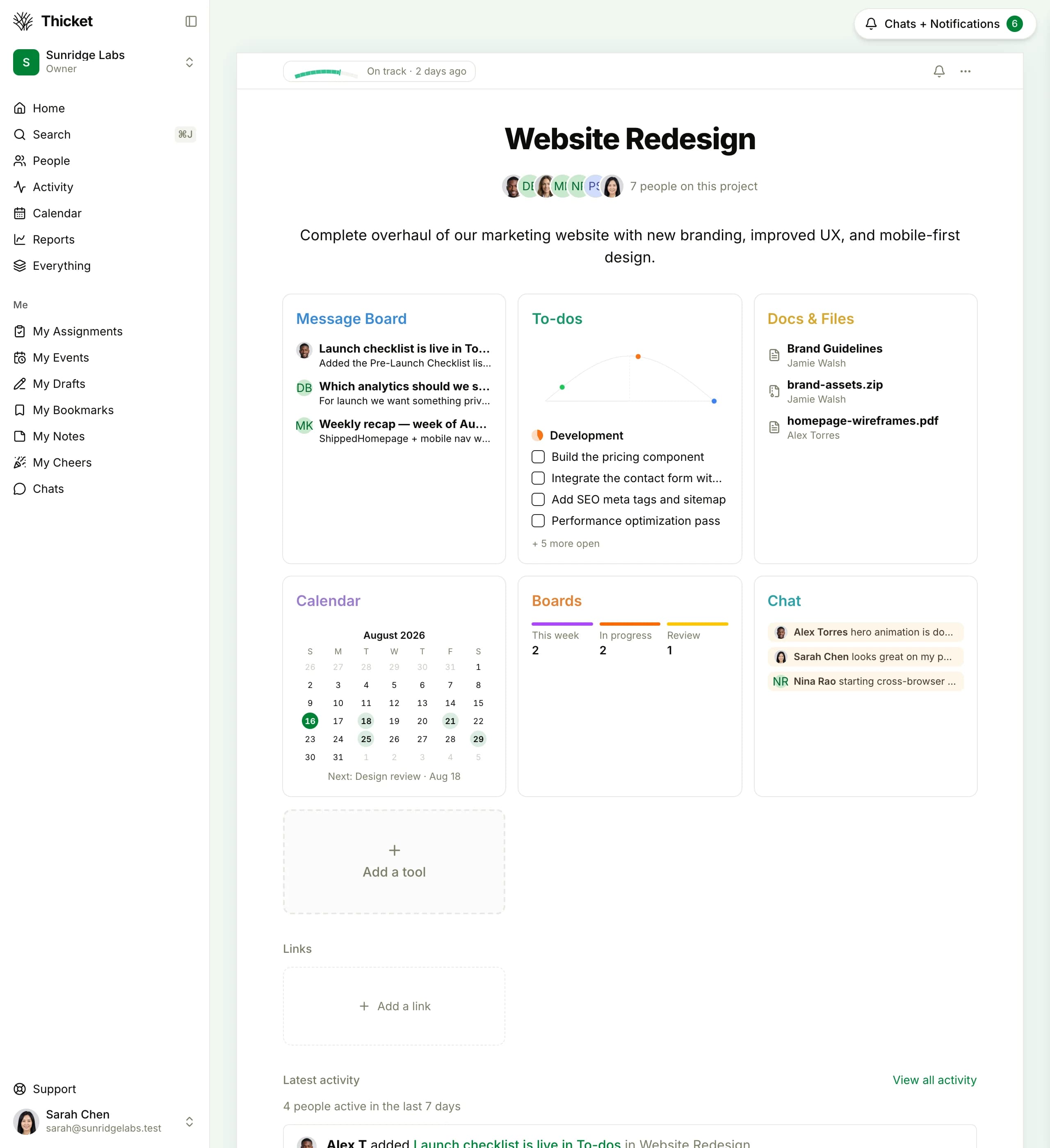
| Project | Project | The cleanest row in the map. Each active Asana project becomes one Thicket project, and the six tools (message board, to-dos, docs & files, schedule, Boards, chat) are ready inside it with nothing to configure. | |
| Sections | To-do lists | Each section in an Asana project becomes a to-do list in the matching Thicket project. The list is the grouping, so there's no board-vs-list view decision to make first. | |
| Task / Subtask | To-dos + grouped to-dos | Tasks become to-dos with the same assignees and due dates. Subtasks become grouped to-dos under the same list. A to-do is open or done; there are no status pipelines to define. | |
| Task in multiple projects | One project per to-do | Asana lets a task live in several projects at once (multi-homing). A Thicket to-do lives in one project, and you can move or copy it across projects. Pick the project where the work really belongs. | |
| My Tasks | My assignments | Everything assigned to you across projects, in one view: all of it, the items with dates, the things you've assigned to others, and an up-next list you order yourself. | |
| Board view | Boards | Asana's board view maps to Thicket's Boards, a kanban board where cards move through columns. Recreate your columns and add cards for in-flight work. | |
| Calendar & due dates | Schedule | Deadlines and events move to each project's schedule: events, recurrence, reminders, and iCal feeds your calendar app can subscribe to. | |
| Status updates | Message board + project health | Asana's colored status updates split into two things that already existed apart: a message board post for the narrative, and the project's health setting (On track / At risk / Off track) plus progress charts for the signal. | |
| Rules & custom fields | Left behind on purpose | Thicket has no automation engine and no custom field types. A to-do carries an assignee, a due date, and notes; the routing Rules used to do becomes a habit instead of a configuration. | |
| Timeline & dependencies | No equivalent | Thicket has no Gantt view and no task dependencies. If dependency planning is central to how your team schedules work, keep a dedicated tool for that part; Thicket won't replace it. | |
| Portfolios, Goals & Workload | No equivalent | Asana's executive layer, and Thicket deliberately doesn't rebuild it. Progress charts and project health answer the small-team version of the question: is this project on track? | |
| Outside collaborators | Client access + approvals | People outside the company get client access: scoped visibility, so they see only what you share, plus approvals on the record. On Thicket's flat price they're included, with no seat math for anyone. |
Your top-level container. People, projects, and billing live in your Thicket organization, the way they lived in your Asana organization or workspace.
Asana groups projects and people under Teams. Thicket keeps it flatter: your organization holds projects, and each project has its own members. The grouping happens per project, without an extra layer.
The cleanest row in the map. Each active Asana project becomes one Thicket project, and the six tools (message board, to-dos, docs & files, schedule, Boards, chat) are ready inside it with nothing to configure.
Each section in an Asana project becomes a to-do list in the matching Thicket project. The list is the grouping, so there's no board-vs-list view decision to make first.
Tasks become to-dos with the same assignees and due dates. Subtasks become grouped to-dos under the same list. A to-do is open or done; there are no status pipelines to define.
Asana lets a task live in several projects at once (multi-homing). A Thicket to-do lives in one project, and you can move or copy it across projects. Pick the project where the work really belongs.
Everything assigned to you across projects, in one view: all of it, the items with dates, the things you've assigned to others, and an up-next list you order yourself.
Asana's board view maps to Thicket's Boards, a kanban board where cards move through columns. Recreate your columns and add cards for in-flight work.
Deadlines and events move to each project's schedule: events, recurrence, reminders, and iCal feeds your calendar app can subscribe to.
Asana's colored status updates split into two things that already existed apart: a message board post for the narrative, and the project's health setting (On track / At risk / Off track) plus progress charts for the signal.
Thicket has no automation engine and no custom field types. A to-do carries an assignee, a due date, and notes; the routing Rules used to do becomes a habit instead of a configuration.
Thicket has no Gantt view and no task dependencies. If dependency planning is central to how your team schedules work, keep a dedicated tool for that part; Thicket won't replace it.
Asana's executive layer, and Thicket deliberately doesn't rebuild it. Progress charts and project health answer the small-team version of the question: is this project on track?
People outside the company get client access: scoped visibility, so they see only what you share, plus approvals on the record. On Thicket's flat price they're included, with no seat math for anyone.
What You Gain, What You Leave Behind
Both lists matter. Naming the second one is what makes the first one credible, so read it before you commit your team.
Not sure if Thicket fits?
Read the full Asana vs. Thicket comparison for the feature-by-feature breakdown, or the exact cost math in how much Asana costs in 2026. Coming from a different tool? There are guides for Monday.com, ClickUp, and Basecamp too.
A flat-rate option for smaller teams
See what the $49/month alternative looks like
Thicket keeps messages, to-dos, docs, schedules, boards, and chat together in every project. One price covers the whole team.
Thicket fits when: your team runs on tasks, comments, and a few active projects, and you want the discussion, docs, and schedule in the same place at a price that ignores headcount.
Choose Asana if: Rules, Timeline dependencies, Portfolios, or Goals carry real weight in how you plan: Thicket has none of them.
Free plan. No card required. Includes a 14-day Pro trial.
Making the Switch Stick
Re-entering tasks is the easy part. The habits around the tasks decide whether the switch holds, and coming from Asana there are three that matter.
Move the conversations, not just the tasks
In most Asana setups the tasks live in Asana and the talk lives somewhere else: quick questions in a chat tool, decisions in email, files in a drive. The consolidation is the actual payoff of this migration, so make it deliberate. Announce decisions on the project's message board (the cutover announcement is a good first post), take quick questions to the project's chat, and let to-do comments hold the task-level detail.
If you skip this and keep the old side channels, you'll have swapped task trackers without gaining much. Bring the conversation with the work.
Let check-ins replace the status ritual
Asana teams often run a weekly status-update routine: someone writes the colored update, someone chases the inputs for it. Thicket's version is automatic check-ins: a recurring question ("what did you work on this week?") that collects everyone's answers without a meeting or a chase. Pair that with the project's health setting (On track / At risk / Off track) and progress charts, and the update mostly writes itself.
Name what changes before someone discovers it
Keep the parallel period short: a few days of Asana-as-reference is usually enough, because the concepts are so close. Spend the saved time on expectations instead. If someone relies on Rules, Timeline dependencies, or Portfolios daily, they should hear from you that those aren't coming, and why the team is trading them for a calmer, flat-priced setup.
Naming the tradeoffs up front is what makes the simpler tool feel like a choice rather than a loss.
Six tools around your tasks, one flat price
Your tasks cross over almost row for row, the conversations finally join them, and the bill stops rounding your team up to the next seat bundle.
Free plan. No card required. Includes a 14-day Pro trial.
$49/month flat. A 10-person team saves $85.90–$255.90/month vs Asana billed monthly
Unlimited users on Pro: employees, contractors, and clients all included
No Rules, custom fields, or views to configure before the team can start
Free plan to evaluate, 14-day Pro trial, cancel anytime
Migration Questions Answered
Common questions from teams considering the switch from Asana to Thicket.
How long does it take to migrate from Asana to Thicket?
Plan for an afternoon. The rebuild moves quickly because there is nothing to configure first: no custom fields to redefine, no Rules to rebuild, no views to set up per project. You re-enter active tasks into a handful of projects, invite people, and start. A team with two or three active projects has less to move than the word migration suggests.
Can I import my Asana data directly into Thicket?
No. There is no importer, and nothing reads an Asana export into Thicket automatically. Asana exports each project to CSV (open the project, click the dropdown next to its name, and choose Export/Print, then CSV), and that file becomes your reference while you recreate active work by hand. Because Thicket has far less to configure than Asana, the rebuild is usually faster than expected, and it is a natural moment to drop the tasks and projects your team stopped using.
Will I lose my Asana data when I switch?
No. Nothing in Asana is deleted when you start using Thicket. Your workspace stays intact until you cancel it, so keep Asana open as a read-only reference while you rebuild, and export the projects you care about to CSV before canceling for a permanent record. Completed tasks and archived projects can simply stay in those exports.
Does Thicket have something like Asana's My Tasks?
Yes. The My assignments view collects every to-do assigned to you across all your projects, with a with-dates view for deadlines, a list of the things you've assigned to others, and an up-next list you order yourself. It plays the same daily role My Tasks does: one place to see your plate.
What happens to Portfolios, Goals, and Workload?
They don't carry over. Thicket deliberately has no portfolio, goal-tracking, or workload layer. Each project instead has progress charts and an On track / At risk / Off track health status, which answers the small-team version of the question. If leadership in your company lives in Portfolios and Goals, Asana is the better fit and you should keep it.
What about Rules and custom fields?
They're left behind on purpose. Thicket keeps a to-do to the essentials: an assignee, a due date, notes, and open or done. Auto-assignment and status pipelines become small manual habits instead of configured rules. If a Rule does daily load-bearing work for your team, weigh that before switching; this guide names everything that doesn't come along.
How much will I save by switching from Asana to Thicket?
Thicket Pro is $49/month flat for unlimited users. Asana charges per seat and, past 5 total users, sells seats only in fixed bundles: Starter is $13.49/user/month billed monthly ($10.99 billed annually) and Advanced is $30.49 ($24.99 annually). A 10-person team pays $134.90/month on Starter or $304.90/month on Advanced, billed monthly, versus $49 flat: $85.90–$255.90 back every month. A 6-person team feels the bundles hardest, paying for 10 seats ($134.90/month on Starter) while Thicket stays $49. (Asana prices verified August 2026.)
Can I invite my whole team and clients without paying per seat?
Yes. Thicket Pro is flat for unlimited users, so employees, contractors, and clients are all included, and there are no seat bundles to round into. Clients get scoped access with approvals: they see only what you share and can sign off on work inside the project.
What if my team doesn't like Thicket after switching?
Thicket has a free plan (1 project, 20 people including clients) to test with before committing, and Pro includes a 14-day free trial with no card required. Your Asana workspace stays intact until you cancel it, so trying Thicket costs an afternoon, not your data. If it isn't the right fit, nothing is lost.
Keep the tasks. Drop the seat math.
A 20-person team pays $269.80–$609.80/month on Asana billed monthly, and a 6-person team pays for 10 seats. Thicket is $49/month flat: the same to-dos, the conversation alongside them, and a bill that never rounds up.
Start with the free plan and rebuild one project. Your Asana workspace stays intact until you're ready to cancel.
Free plan. No card required. Includes a 14-day Pro trial.