The Calm Trello Alternative
at One Flat Price
You didn't stop liking boards. The board stopped being enough. Thicket keeps the kanban board and puts the other five tools you've been stitching around it in the same project.
$49/month flat. Unlimited users. Boards included.
Free plan. No card required. Includes a 30-day Pro trial.
Why Teams Look for a Trello Alternative
Almost nobody quits Trello because it's bad. It's a beloved, genuinely cheap tool that does one thing brilliantly: cards moving through columns. Teams start looking for an alternative when the board stops being the whole job, and the work around the board has quietly spread across five other apps.
That's not an accusation, just Atlassian's ladder. Trello points upward, toward Premium and eventually Jira. Thicket points the other way: toward fewer tools, not more.
It Was Never Just Trello
A "Trello team" is usually a five-app team with a board in the middle. Here's where the rest of the work tends to live, and where it lands in a single Thicket project.
Team conversations
Around Trello: Slack threads about cards, scattered across channels
In Thicket: A message board for announcements and decisions, plus group chat and direct messages, all in the same project as the board
To-dos with owners and dates
Around Trello: A spreadsheet, a notes app, or checklists buried inside cards
In Thicket: To-do lists with assignments, due dates, and groups. A real to-do tool, not a checkbox strip
Documents
Around Trello: Google Docs linked from card descriptions
In Thicket: Docs & files: rich documents and organized file storage that live with the project
Deadlines
Around Trello: A separate calendar that someone re-types dates into
In Thicket: A schedule with events, recurrence, reminders, and iCal feeds, so dated work sits in one place
Client updates
Around Trello: Email threads and forwarded screenshots of the board
In Thicket: Client access with scoped visibility; clients see only what you share, at no per-seat cost
The Board, and Everything Around It
Every Thicket project carries the same six tools: message board, to-dos, docs & files, schedule, Boards, and chat. Nothing to configure, nothing to stitch together.
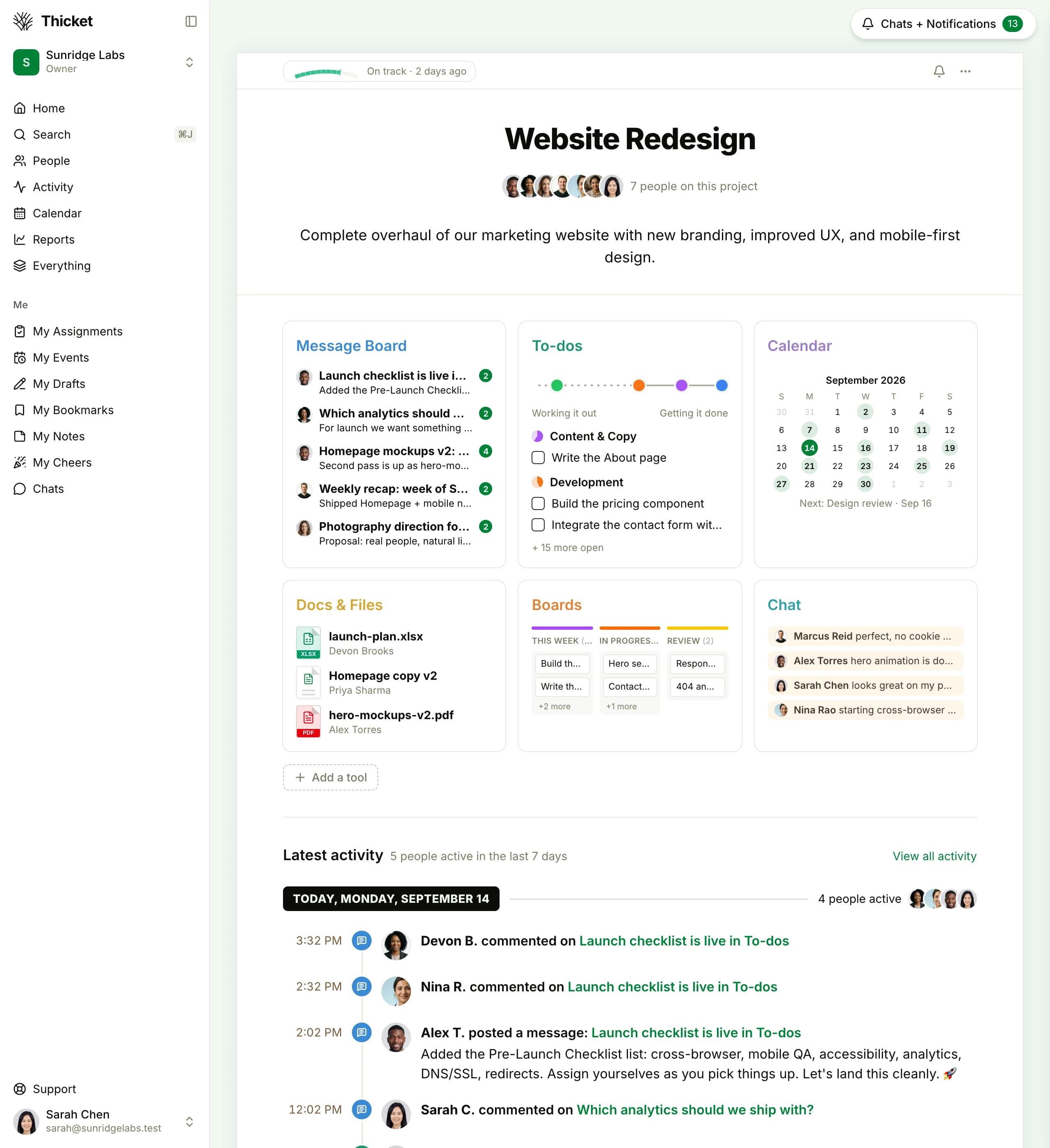
A single Thicket project: the conversations, tasks, docs, and dates that used to orbit your Trello board, in one place.
Per-User Pricing vs One Flat Price
Thicket Pro is $49/month for your whole organization. On Trello every person adds $6 a month on Standard, so from 9 people Thicket costs less than Standard, and from 4 people it costs less than Premium.
| Team Size | Thicket Proflat | Trello Standard$6/user/mo, billed monthly | Trello Premium$12.50/user/mo, billed monthly |
|---|---|---|---|
| 10 users | $49/mo | $60/mo | $125/mo |
| 15 users | $49/mo | $90/mo | $187.50/mo |
| 20 users | $49/mo | $120/mo | $250/mo |
| 30 users | $49/mo | $180/mo | $375/mo |
Trello Standard at $6/user/month and Premium at $12.50/user/month, billed monthly (the advertised $5 and $10 are annual-billing rates). Thicket Pro is $49/month flat ($39/month billed annually). Prices verified September 2026.
The comparison that actually matters
For most teams the real bill isn't Trello vs Thicket. It's Trello plus the paid chat tool, the docs subscription, and the calendar app stitched around it, each with its own per-seat pricing and its own invoice. We won't invent numbers for your particular stack, but the shape of the math is simple: several per-seat bills that each grow with headcount, against one $49 flat rate that doesn't.
Your Trello Board Maps 1:1 to Thicket Boards
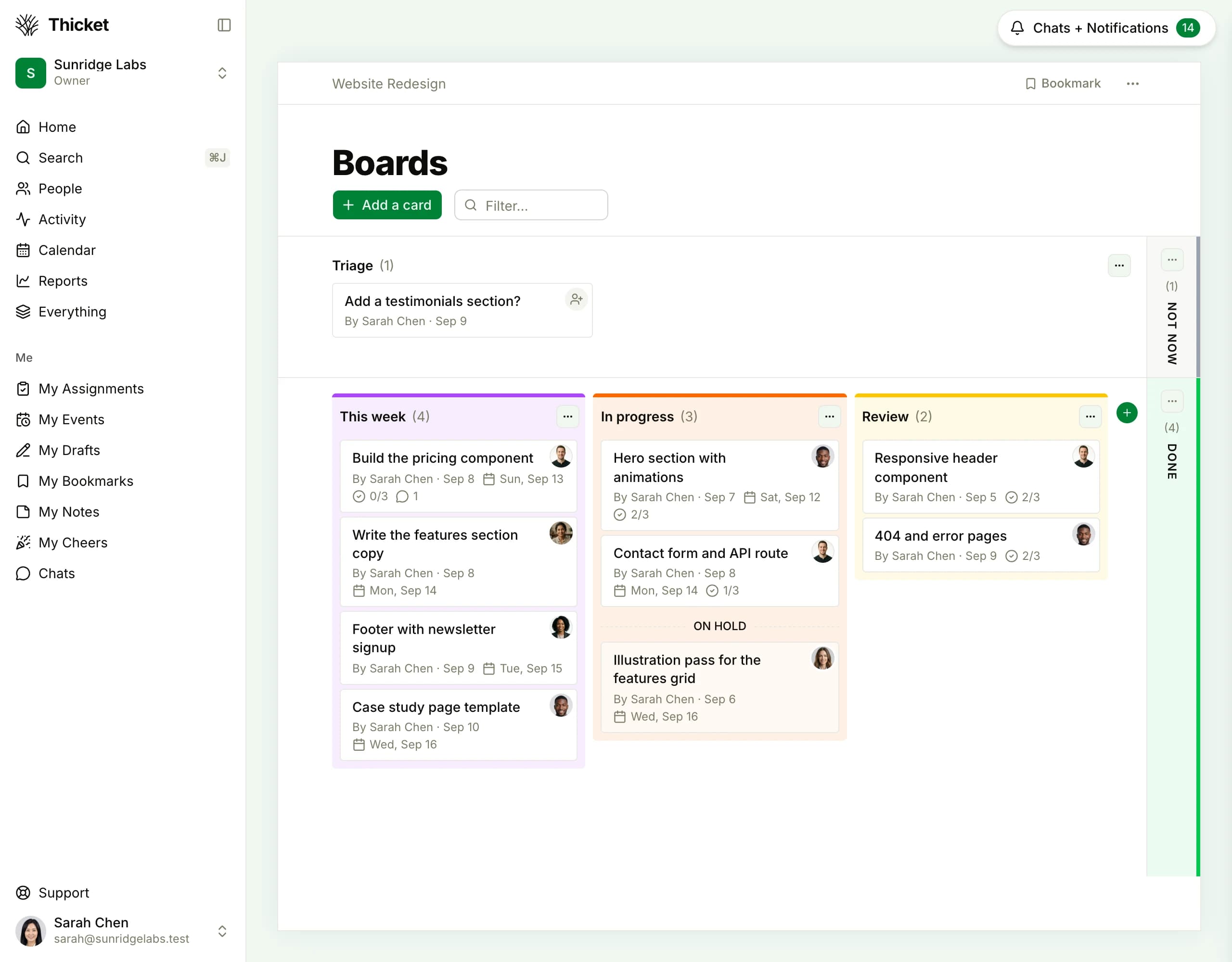
Nothing about the board model changes: columns are columns, cards are cards. Here's where each Trello concept lands.
| In Trello | In Thicket | What changes |
|---|---|---|
| A board | Boards | Same mental model: cards moving through columns. |
| Lists (columns) | Columns | Named columns in the order you set, as in Trello. |
| Cards | Cards | Assignees, due dates, sub-steps, rich notes, and comments travel with the card. |
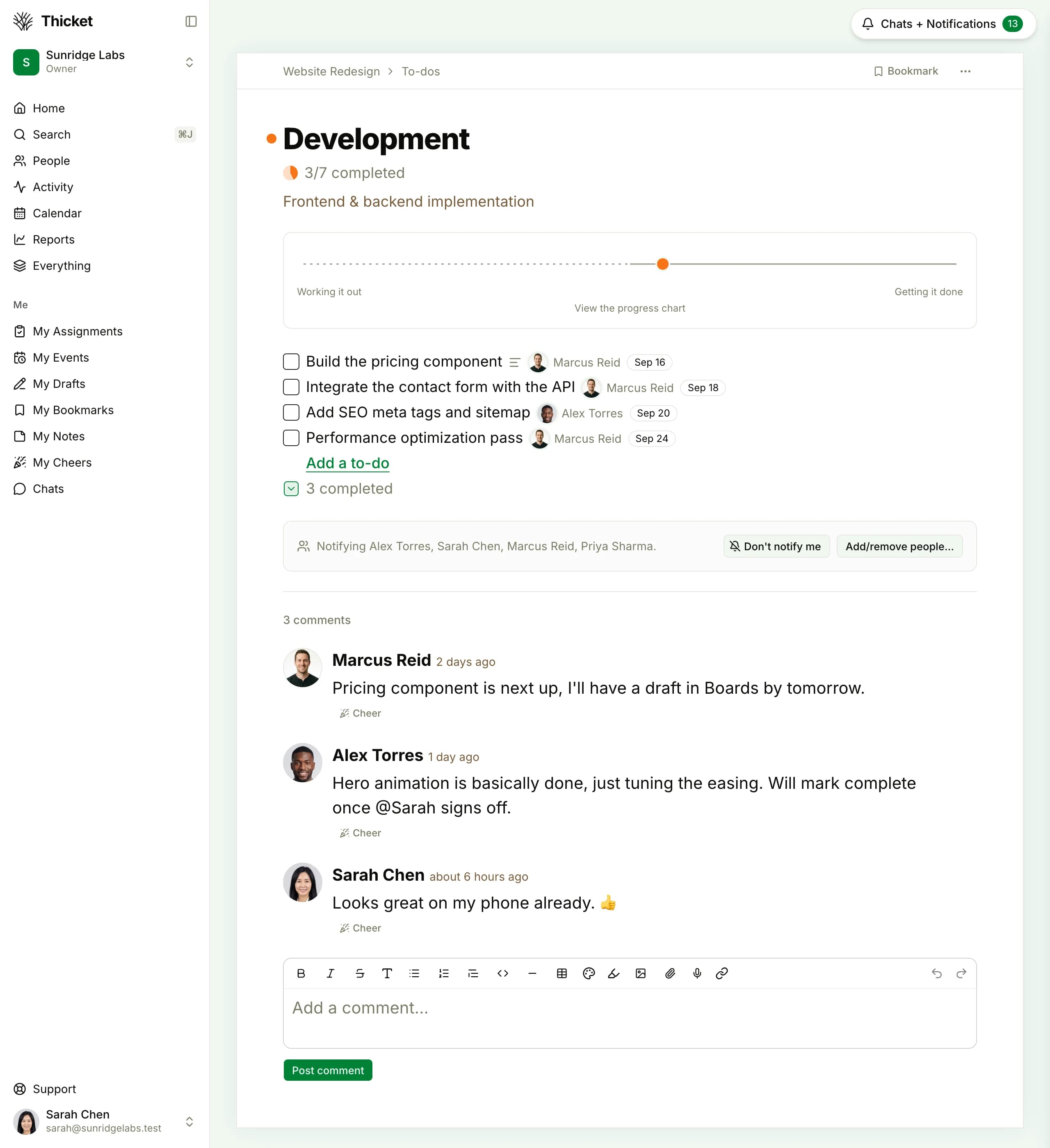
| Checklists | To-do lists | Promoted to a full to-do tool with lists, groups, assignments, and due dates, instead of checkboxes inside a card. |
| Due dates | Schedule | Dated work lands on a real project calendar with events, recurrence, reminders, and iCal feeds. |
| Attachments | Docs & files | Rich documents plus organized file storage, instead of files pinned to cards. |
And what has no Trello equivalent
Already in the same project, at no extra cost:
- Message board, so announcements and decisions stay with the project
- Group chat & direct messages, no separate chat subscription
- Automatic check-ins: recurring questions, answers collected in one thread
- Client access, with each item shared with the client or kept to the team as you post
- Progress charts showing On track / At risk / Off track at a glance
- Project templates to set up the next project from the last one
Who Thicket Is Built For
One project, six tools, one flat price
Set up one board in a project and retire the apps around it. Start free, no credit card required.
Free plan. No card required. Includes a 30-day Pro trial.
$49/month flat for unlimited users, clients and contractors included
Boards (kanban) plus message board, to-dos, docs & files, schedule, and chat
Automatic check-ins, client access, and progress charts built in
30-day free trial of Pro, or start on the free plan
Common Questions About Leaving Trello
Is there a free alternative to Trello?
Trello's own free plan covers boards-only work for up to 10 collaborators across 10 boards, with unlimited cards. Thicket's free plan includes 1 project for up to 20 people (clients included) with 1 GB of storage, and all six tools: Boards, message board, to-dos, docs & files, schedule, and chat. Use it to test whether one project with everything in it beats ten boards with nothing around them.
Does Thicket have a kanban board like Trello?
Yes. Boards is one of Thicket's six core tools, and it's a kanban board: cards moving through columns. A Trello board maps to it almost 1:1. Your lists become columns and your cards become cards, with assignees, due dates, sub-steps, notes, and comments. The difference is what surrounds the board: in Thicket the same project also has a message board, to-do lists, docs & files, a schedule, and group chat.
How much does Trello cost compared to Thicket?
Trello Standard is $6 per user per month and Premium is $12.50 per user per month, billed monthly (the advertised $5 and $10 are annual-billing rates). Thicket Pro is $49/month flat for unlimited users. At 10, Standard is $60 and Premium is $125; at 20 they're $120 and $250, all against the same $49 flat.
From what team size does Thicket cost less than Trello?
Thicket Pro is $49/month for unlimited people, clients and contractors included. On monthly billing it costs less than Trello Standard from 9 people ($54/month on Standard) and less than Premium from 4 people ($50/month). The Thicket price includes the message board, to-dos, docs and files, schedule and chat alongside the board, and it stays the same as the team grows.
Do clients count as paid users in Thicket?
No. Thicket Pro is $49/month flat for unlimited people: team members, clients, and contractors all included. Client access is scoped: clients see only what you mark visible to them, and they comment on it right in the project. On Trello's paid plans, pricing is per user, so the bill grows with the Workspace.
The board was never the problem
Keep the part of Trello you love and bring the other five tools into the same project: $49/mo flat, unlimited users, free plan to start.