The Flat-Rate Teamwork Alternative
for Client Work
Client work means people coming and going: new hires, contractors, and clients on every project. Thicket charges one flat price no matter how many of them you add, with client access and approvals built into every project.
$49/month flat. Unlimited users. Clients included.
Free plan. No card required. Includes a 30-day Pro trial.
Why Teams Look for a Teamwork Alternative
First, to be clear about which product we mean: Teamwork.com, the project management platform for client work, not Teamworks, the athletics software. Teamwork.com is a capable platform, and its focus on agencies is real. The teams that go looking for an alternative usually aren't running from the features. They're running from the bill's shape: a per-user meter on a roster that never stops changing, and a tier ladder that keeps the best client-work features a step above the plan you're on.
Client Access Comes Standard, for Every Client
Teamwork has client users on its paid plans too, so what should you compare? The cost of client access, and how it works day to day. In Thicket, every project on every plan can host clients, they never touch the bill, and the workflow is three steps: invite the client, choose what they see, and put sign-offs on the record.
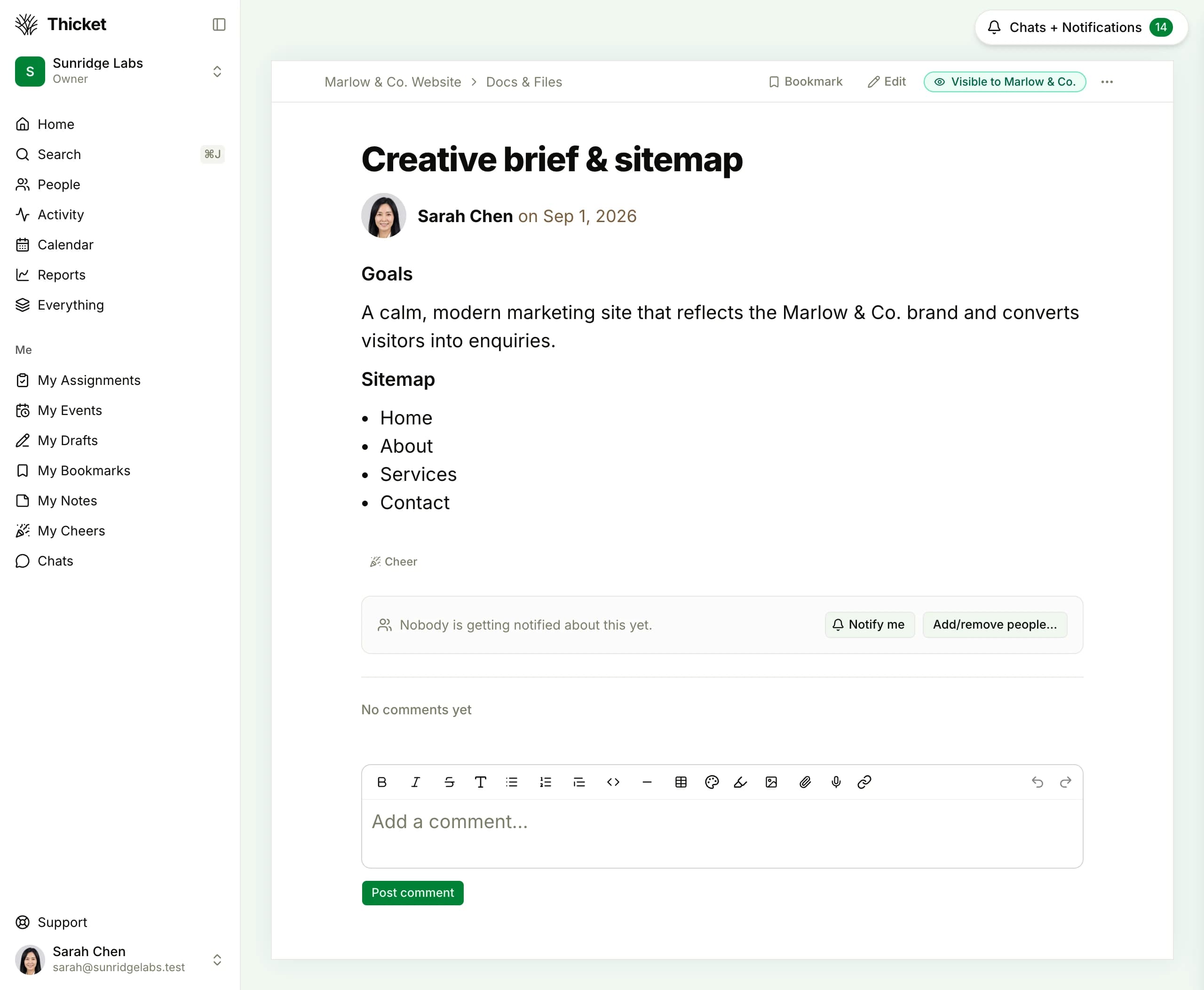
Sharing is opt-in, item by item. Every item in a client project wears a visibility flag with your client's actual company name, so there's never any doubt what they can see. Your client never sees the flags; their view just looks clean.
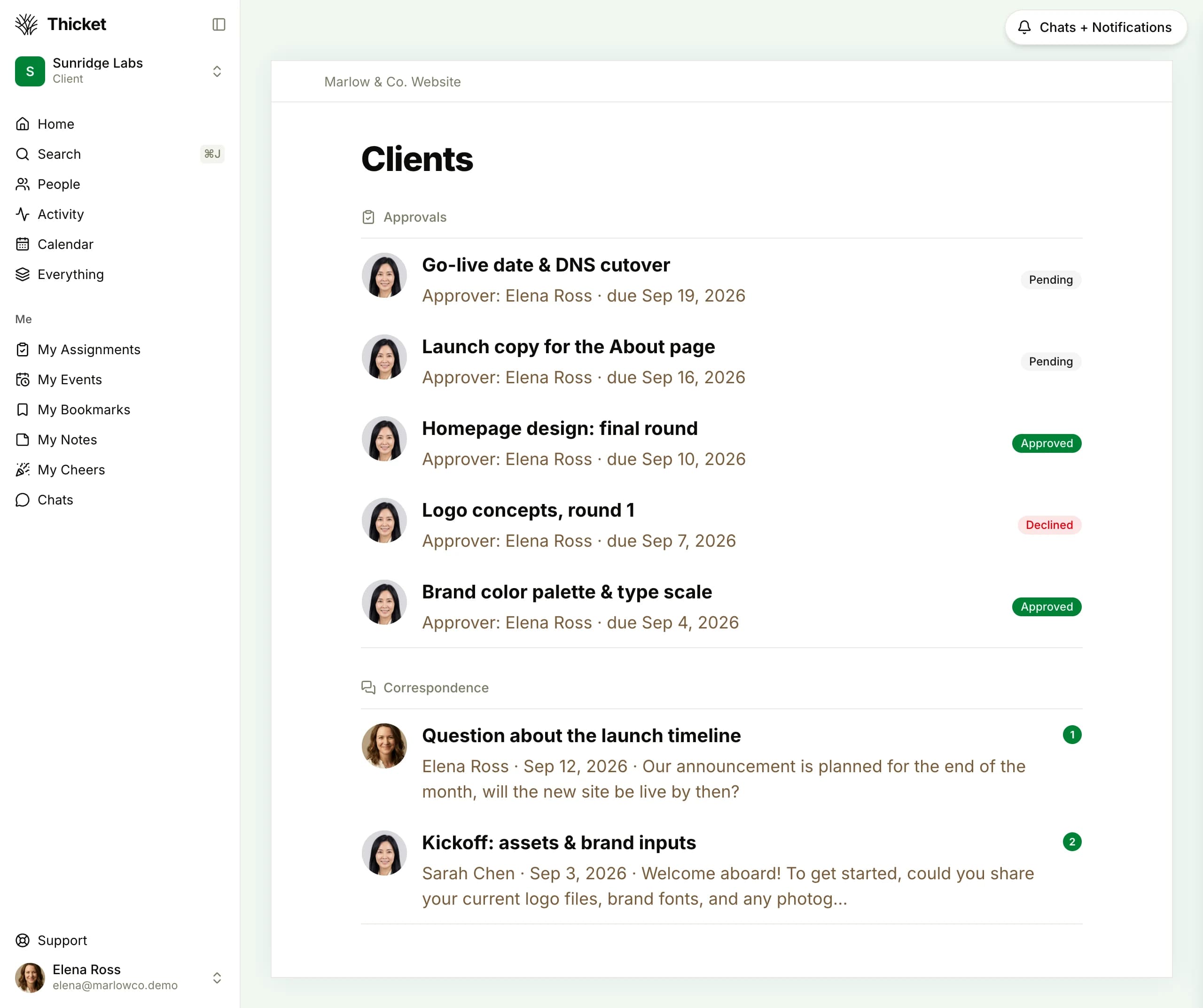
The client's own view, signed in as the client: only the one project they were invited to, with their approvals and correspondence. Each sign-off is logged with a name and a date.
The full workflow, scoping rules included, is on the client project management page. Agencies specifically may want the agency project management page.
Six Tools in Every Project
Every Thicket project carries the same six tools, on every plan. Nothing to configure, nothing gated a tier above you.
Message board
Announcements and decisions that stay with the project
To-dos
Lists, groups, assignments, and due dates
Docs & files
Rich documents and organized file storage
Schedule
Events, recurrence, reminders, and iCal feeds
Boards
A kanban board: cards moving through columns
Chat
Group chat per project, plus direct messages
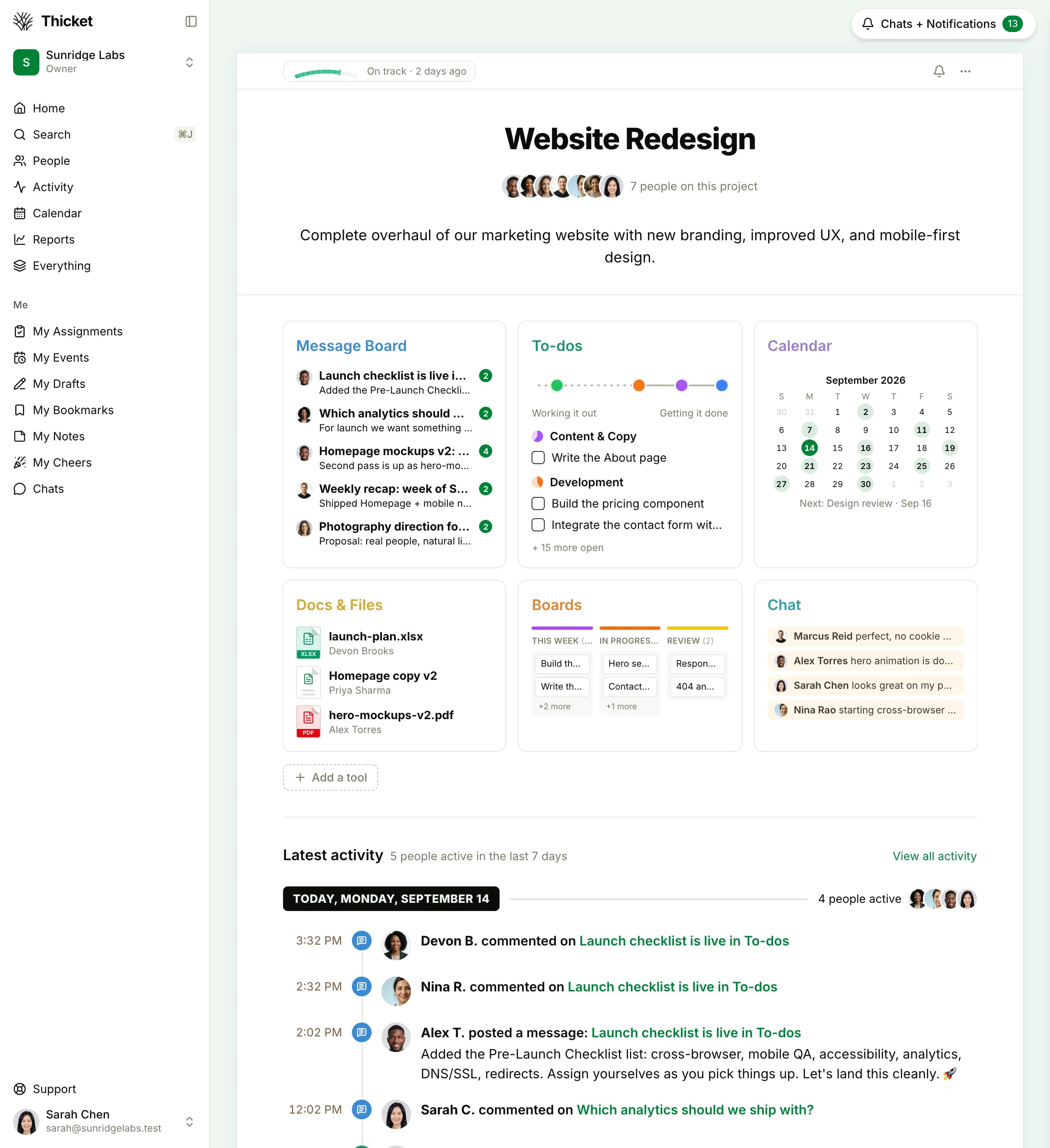
A single Thicket project: conversations, tasks, docs, dates, and the board, with client access riding along at no extra cost.
Teamwork Is Cheaper Up to 3 People. Then It Isn't.
Let's be plain: up to 5 people can use Teamwork free (on up to 5 projects), and 3 people on Basics cost about $41.97/month billed monthly (derived), under Thicket's $49 flat rate. If that is your headcount and Basics covers what you need, you should probably just pay Teamwork. The flat rate starts winning at 4 people, on both billing cycles, and against Accelerate it wins from 2.
| Team Size | Thicket Proflat | Teamwork Basics$13.99/user/mo, derived monthly* | Teamwork Accelerate$34.99/user/mo, derived monthly* | Cheaper Option |
|---|---|---|---|---|
| 3 users | $49/mo | $41.97/mo | $104.97/mo | Teamwork Basics: $7.03 less |
| 5 users | $49/mo | $69.95/mo | $174.95/mo | Thicket: $20.95 less than Basics |
| 10 users | $49/mo | $139.90/mo | $349.90/mo | Thicket: $90.90 less than Basics |
| 20 users | $49/mo | $279.80/mo | $699.80/mo | Thicket: $230.80 less than Basics |
* Derived monthly rates: Teamwork publishes only annual-billing prices ($9.99 Basics, $24.99 Accelerate per user per month) plus a "Save 29%" annual discount; the monthly figures above are computed from that discount. Optimize and Enterprise are custom-priced with no published figures. Thicket Pro is $49/month flat ($39/month billed annually). Prices verified September 2026.
The crossover, stated exactly: at 4 users, Basics passes the flat rate on both billing cycles ($55.96 derived monthly against $49, and $39.96 billed annually against Thicket's $39 annual rate). At 10 people on Basics the gap is $90.90/month; at 20 it's $230.80. And those numbers assume nobody ever joins mid-project, which is exactly what client work never does.
What Thicket leaves out: read before you switch
Teamwork can invoice clients. Thicket can't. No invoicing and no retainer or budget management: billing stays in your accounting tool. There are also no Gantt charts, dependencies, or workload views, and no automation engine. If you bill clients through your project management tool, or you plan resourcing across a big roster, Teamwork earns its price and you should keep it. We'd rather lose the signup than have you find out after switching. What Thicket does instead is run the work: six tools, client access, approvals, automatic check-ins, and progress charts, at one flat price.
Is Thicket Right for You?
A fit check based on the features each product ships.
Six tools, client access, no per-user math
Set up one client project, invite your clients for free, and put approvals on the record. Start free, no credit card required.
Free plan. No card required. Includes a 30-day Pro trial.
$49/month flat for unlimited users, clients and contractors included
Client access with scoped visibility and approvals in every project
Message board, to-dos, docs & files, schedule, Boards, and chat
30-day free trial of Pro, or start on the free plan
Common Questions About Leaving Teamwork
Is there a free alternative to Teamwork.com?
Teamwork's own free plan covers up to 5 users and 5 projects, which can suit a very small team with a handful of engagements. If that covers how you work, you don't need an alternative. Thicket's free plan takes a different shape: 1 project for up to 20 people (clients included) with 1 GB of storage. Theirs caps people, ours caps projects. If your bottleneck is how many people, including clients, need to be in the room, Thicket's free plan fits more of them.
How much does Teamwork.com cost compared to Thicket?
Teamwork publishes only annual-billing rates: $9.99 per user per month on Basics and $24.99 on Accelerate. Its "Save 29%" banner implies derived monthly rates of about $13.99 and $34.99 per user. Thicket Pro is $49/month flat for unlimited users ($39/month billed annually). On Basics at the derived monthly rate, 5 people cost $69.95, 10 cost $139.90, and 20 cost $279.80, all against the same $49 flat.
Is Teamwork.com cheaper than Thicket?
At small sizes, yes, and we'd rather say so than bury it. Up to 5 people can use Teamwork free (on up to 5 projects), and 3 people on Basics cost $41.97/month at the derived monthly rate ($29.97 billed annually), under Thicket's $49 flat. The math flips at 4 users on both billing cycles: $55.96 derived monthly against $49, and $39.96 annual against Thicket's $39 annual rate. Against Accelerate, the tier Teamwork's feature gating points growing agencies toward, the flat rate wins from just 2 users ($69.98/month derived).
Do clients count as paid users in Thicket?
No. Thicket Pro is $49/month flat for unlimited people: team members, clients, and contractors all included. Client access is scoped, so clients see only what you mark visible to them, and they can sign off on work through approvals. Even the free plan's 20-person pool includes clients. Adding a person to Thicket never changes the bill, whoever they are.
Does Thicket have invoicing like Teamwork.com?
No. Thicket has no invoicing and no retainer or budget management. That's a deliberate scope choice: Thicket runs the work itself (conversations, to-dos, docs, schedules, boards, and client sign-offs), and billing stays in your accounting tool. If invoicing clients inside your project management tool is the point, Teamwork earns its price and you should keep it.
Can clients approve work in Thicket?
Yes. Approvals are part of client access: you request sign-off on the work itself, with a title, details, the client as approver, and an optional due date. The client makes a clear decision, and it's logged with their name and the date, so every request reads pending, approved, or declined at a glance. No more digging through email threads to prove who approved what.
Your bill shouldn't move with your client roster
Six tools plus client access and approvals in every project: $49/mo flat, unlimited users, free plan to start.