For amateur, semi-pro, and collegiate esports organizations
Esports Team Management Software for the Whole Org
One place for the scrim and match schedule, sponsor deliverables, the content calendar, tryouts, and playbooks. Discord stays for voice; Thicket is where the plan lives and can be found a month later.
Flat plans from $25/month. Pro is $49/month for unlimited people, players included.
Free plan. No card required. Includes a 30-day Pro trial.
What should an esports org run on besides Discord?
Keep Discord. It is free, and voice, real-time chat, and the community server belong there. The problem is what happens to the plan: the scrim block for the second roster, who owns the sponsor recap due Friday, the tryout shortlist, the brand kit, the decision about a roster change. In a channel, each of those scrolls away and gets asked again.
Once there are two or three rosters, a content person, someone handling sponsors, and tryouts twice a year, the org needs a place where the schedule, to-dos, documents, and decisions live.
Per-seat tools charge $6 to $14 per person per month on their entry tiers, so 20 people cost $120 to $280 a month. Thicket gives each roster, event, or sponsor a project with six tools, plus client access, automatic check-ins, and templates, at $49/month for unlimited people. Players count as people, at no charge. Esports organizations are among the teams already using Thicket. Explore project examples across industries.
One project per roster or event
Each roster, tournament run, or sponsor gets a project with the same six tools. A template gives every new roster the same starting shape.
Players and staff in one pool
20 people on Free and Starter, unlimited on Pro. Players, coaches, managers, content staff, and partnerships all count the same: no seat charge.
Sponsors see only what you share
Client access is a per-project switch. A sponsor or a school's program office sees the items you mark as shared and approves deliverables on the record.
The client-access mechanics, step by step, are on the client project management page. This page covers how an esports org runs on Thicket and what it pays.
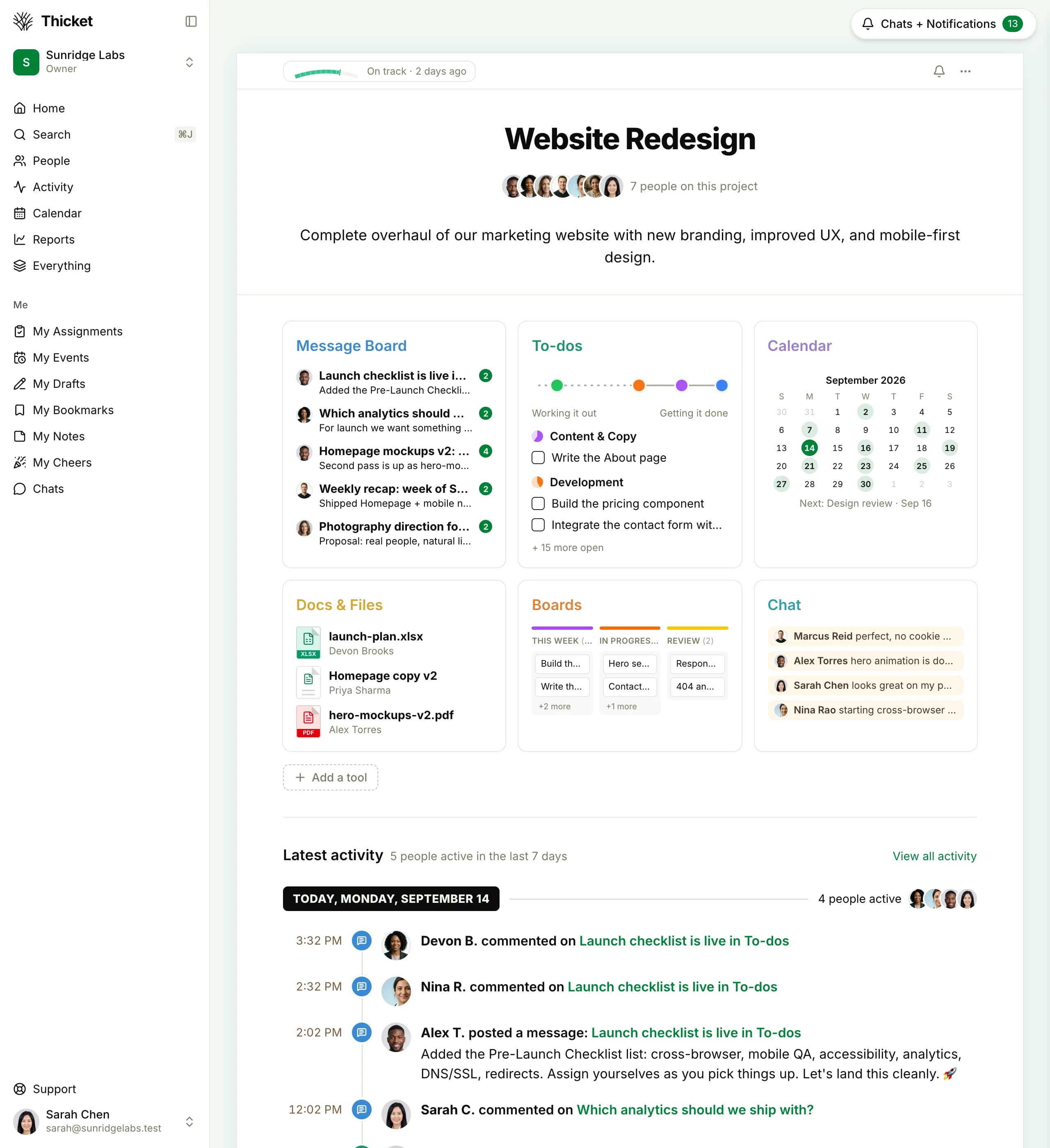
Everything for one roster, in one project
The message board, to-dos, docs and files, calendar, board, and chat for that roster, with the project's health badge at the top. The same shape for every roster, event, and sponsor.
What stays on Discord, and what moves
Discord is free and it is where the org talks. Thicket is where the org keeps the things it has to find again.
Players subscribe to the project schedule by iCal, and announcements go on the message board, where they stay.
Quick facts
What an esports org gets on Thicket
Thicket is flat-rate project management for amateur, semi-pro, and collegiate esports organizations. Each roster, event, or sponsor gets a project with six tools; sponsors and a school's program office get scoped client access with approvals; and the price is the same for 8 people or 40.
- Price
- Starter $25/mo (3 projects, 20 people). Pro $49/mo flat, or $39/mo annual, unlimited people and projects
- Free plan
- 1 project, 20 people including sponsors, 1 GB, no card
- Who it fits
- Esports orgs of roughly 8 to 40 people: players across rosters, coaches, managers, content and social staff, partnerships
- Discord
- Stays, free, for voice and real-time. Thicket holds the schedule, to-dos, docs, and decisions.
- Six tools per project: message board, to-dos, docs & files, schedule, boards, chat
- Client access with approvals for sponsors, partners, or a collegiate program office: per-item visibility, sign-off recorded with name, date, and status
- Automatic check-ins, project templates, progress charts, @-mentions
How an esports org runs on Thicket
Six steps, using only what ships in every project.
- 1
Create one project per roster, and one per event
Start each roster from a project template so the to-do lists (scrim prep, match logistics, content deliverables), the docs folder, and the schedule are already in place. A tournament run or a LAN gets its own project with a start and an end.
- 2
Put the schedule where phones can see it
Scrim blocks, match days, stream slots, and content drops go on the project schedule. Recurring events recur, reminders go out, and every player subscribes by iCal from their phone's calendar app.
- 3
Track sponsor obligations as to-dos with dates
One project per sponsor, or one list per sponsor inside a partnerships project. Each obligation (logo placement, monthly recap, a set number of posts) is a to-do with an owner and a due date, so the month's deliverables are a list, not a memory.
- 4
Run tryouts, content, and sponsor prospects on boards
A board per pipeline. Columns are yours to name: Applied, Trial scrim, Offer for recruitment; Idea, Filming, Editing, Scheduled for content. Cards move as the work does.
- 5
Give sponsors and the program office scoped access
Turn on client access on the sponsor's project, add their contact, and mark what they can see. They approve deliverables on the record. A collegiate program office gets the same kind of view.
- 6
Replace the staff meeting with a check-in
A recurring question, such as What did you work on this week?, goes to managers, content, and partnerships on a schedule and collects the answers in one thread.
A deliverable is a to-do with an owner and a date
One list per sponsor, one to-do per obligation. The progress chart above the list shows where it stands, and the comments under it hold the back-and-forth.
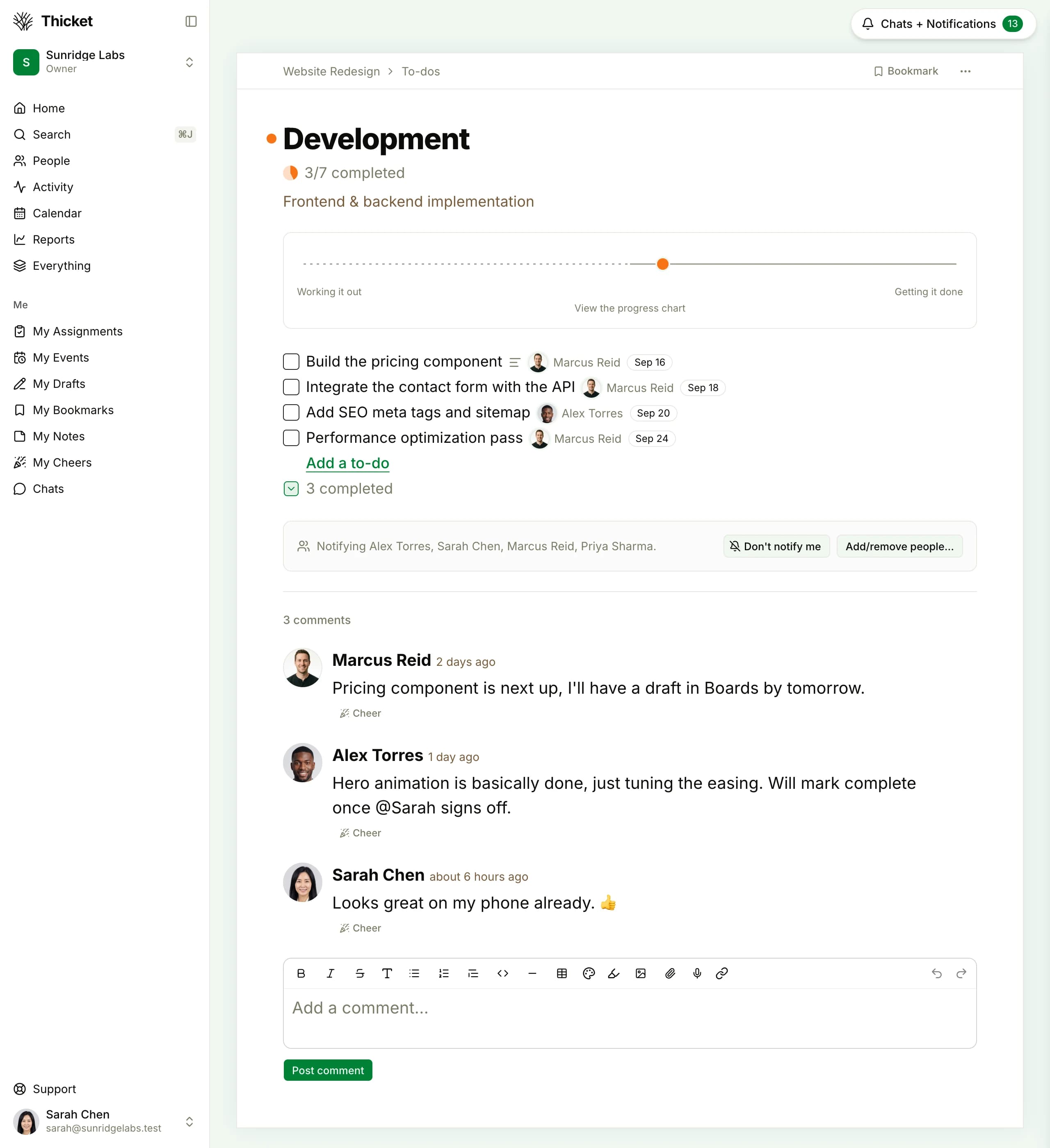
Tryouts, content, and sponsor prospects as pipelines
Boards is the kanban tool in every project. Name the columns for the pipeline, give each card an owner and a date, and move it as the work moves.
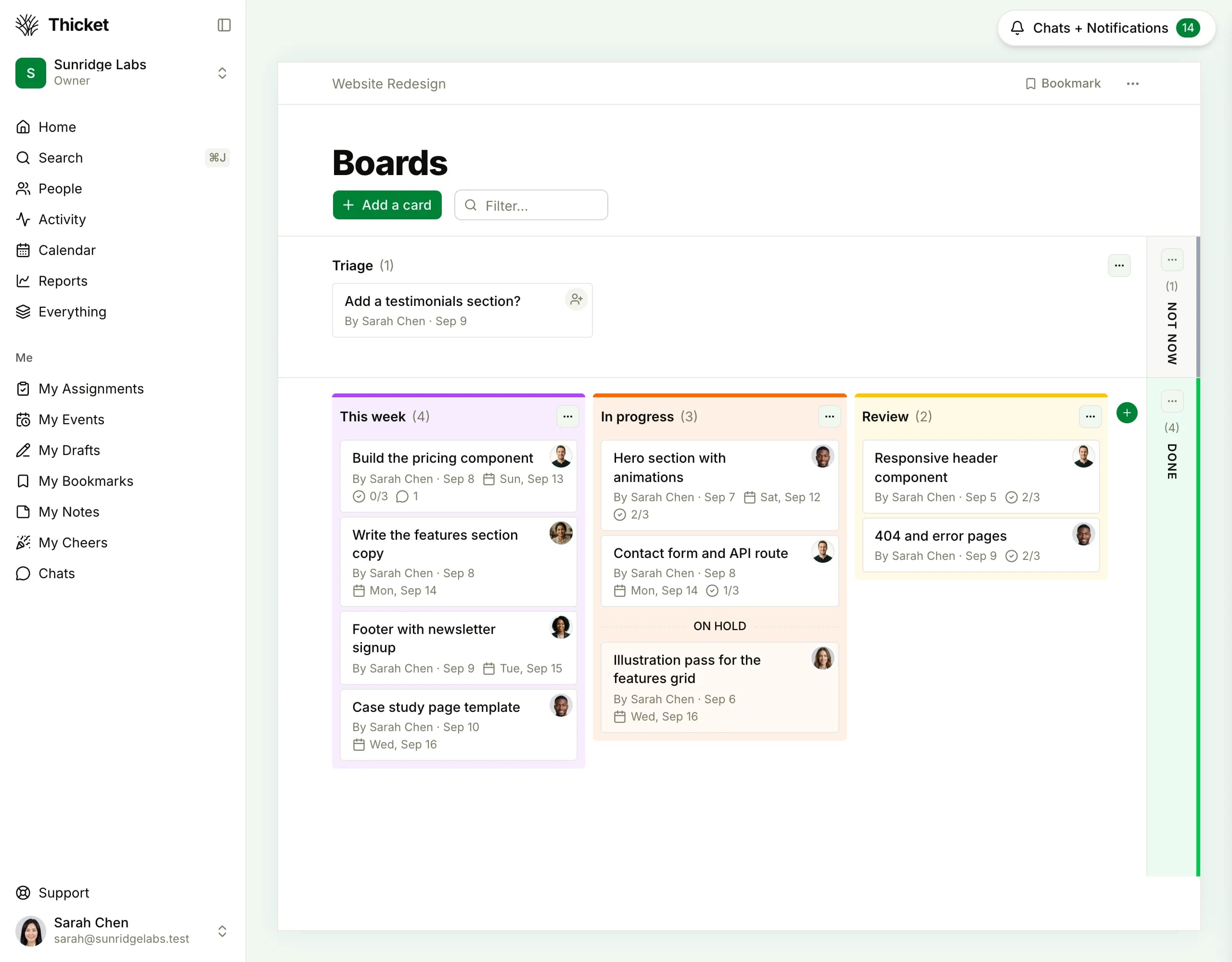
Sponsors and the program office see only what you share
Client access is a switch on each project. A sponsor contact, a partner, or a school's program office is added on the Clients tab and sees the items the team marks as shared. Internal to-dos, docs, and messages stay internal.
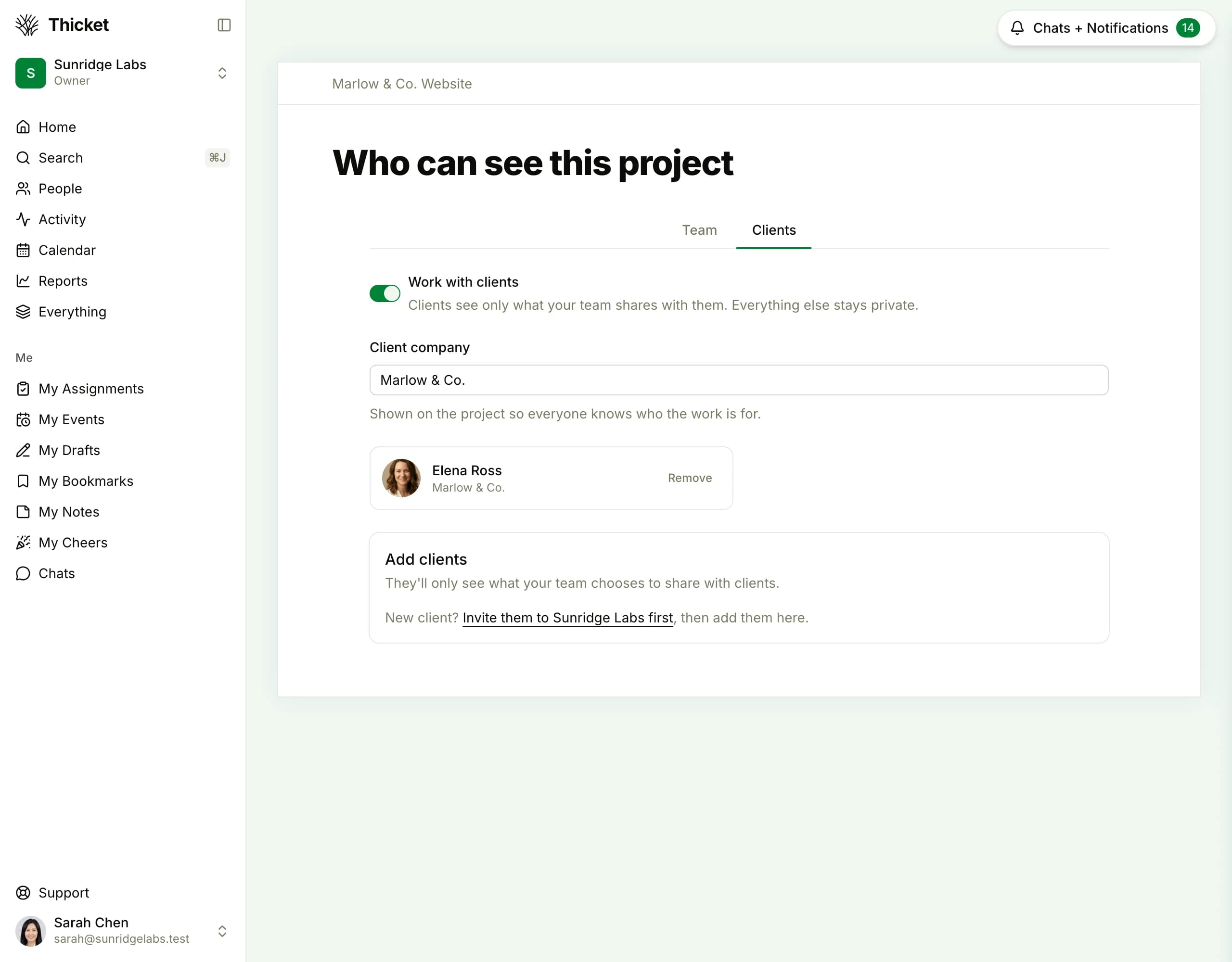
Six tools, mapped to how an org works
Every roster's project starts with the same six tools.
Plus client access with approvals, automatic check-ins, project templates, and progress charts, on every plan.
Monthly cost for a 10-, 20-, 30-, or 40-person org
Everyone in the org counted, on monthly billing, each vendor's entry paid tier against Thicket. On a per-seat tool, a player on the second roster costs the same as the general manager. On Thicket, players are people in the same pool as staff.
| People | Thicket Starterflat, up to 20 people | Thicket Proflat, unlimited | Notion Plus$12/user | Trello Standard$6/user | ClickUp Unlimited$10/user | Asana Starter$13.49/user | Monday.com Standard$14/user |
|---|---|---|---|---|---|---|---|
| 10 people | $25/mo | $49/mo | $120/mo | $60/mo | $100/mo | $134.90/mo | $140/mo |
| 20 people | $25/mo | $49/mo | $240/mo | $120/mo | $200/mo | $269.80/mo | $280/mo |
| 30 people | Over 20 people | $49/mo | $360/mo | $180/mo | $300/mo | $404.70/mo | $420/mo |
| 40 people | Over 20 people | $49/mo | $480/mo | $240/mo | $400/mo | $539.60/mo | $560/mo |
Prices in USD, monthly billing, from each vendor's public pricing page: Notion verified August 2026, Trello verified September 2026, ClickUp verified August 2026, Asana verified August 2026, Monday.com verified August 2026. Monday.com plans start at 3 seats. Asana sells paid seats in fixed bundles; the headcounts here fall exactly on a bundle. Starter is limited to 3 active projects and 20 people. Annual billing lowers every rate here, including Thicket's (Pro $39/month, Starter $20/month). Discord is not priced: it is free, and it stays.
One flat price as the org grows
From 9 people up, Thicket Pro is the lower monthly bill against all five. At 20 people the gap is $71 to $231 a month, or $852 to $2,772 a year. At 30 people it is $131 to $371 a month, or $1,572 to $4,452 a year.
One roster, under 20 people? Starter is $25/month for 3 active projects, and from 5 people up it is the lower bill against all five as well.
What Thicket gives an esports org
Run one roster in Thicket for two weeks
Create a project for one roster, invite its players and staff, put the scrim block on the schedule, and add this month's sponsor deliverables as to-dos with dates. That is enough to tell whether the shape fits your org.
Free plan. No card required. Includes a 30-day Pro trial.
$49/month flat on Pro: unlimited projects and people, players included
Six tools per project, client access with approvals for sponsors, automatic check-ins
Free plan: 1 project, 20 people including sponsors
30-day Pro trial, no credit card required
Questions org managers ask before switching
What should an esports org use besides Discord?
Keep Discord for voice, the community server, and real-time talk during scrims and matches. Use a project tool for the things that need to be found later: the scrim and match schedule, sponsor deliverables with due dates, the content pipeline, tryouts, playbooks, and roster decisions. Thicket puts all of that in one project per roster or event, with six tools in each, for $49/month with unlimited people.
How much does it cost to run a 20- or 30-person esports org on a project tool?
On monthly billing, 20 people on each vendor's entry paid tier cost: Notion Plus $240, Trello Standard $120, ClickUp Unlimited $200, Asana Starter $269.80, Monday.com Standard $280. At 30 people: Notion Plus $360, Trello Standard $180, ClickUp Unlimited $300, Asana Starter $404.70, Monday.com Standard $420. Thicket Pro is $49/month for unlimited people and projects, or $39/month billed annually ($468/year), and players count as people at no charge.
Can a sponsor see their deliverables without seeing the rest of the org?
Yes. Client access is a per-project switch. Turn on Work with clients on the sponsor's project, add the sponsor contact, and mark which to-dos, docs, and messages they can see. Everything else in that project, and every other project, stays internal. A deliverable shared for approval is approved or declined by the sponsor and recorded with their name, the due date, and the status. A collegiate program office can be given the same kind of access.
How do we get scrims, matches, and streams onto every player's phone?
Put them on the project schedule. Scrim blocks can recur, events carry reminders, and each person subscribes to the schedule from their phone's calendar app through the iCal feed.
Can we run tryouts and a content pipeline in Thicket?
Yes, on Boards, the kanban tool in every project. A tryout board might run Applied, Reviewed, Trial scrim, Offer, and Declined; a content board might run Idea, Scripting, Filming, Editing, Scheduled, and Published. Cards carry an owner, a due date, and a checklist, and move between columns you name. Sponsor prospects can run on a third board the same way.
Is Starter enough for one roster, and is there a free plan?
Starter is $25/month for 3 active projects and up to 20 people, which fits a single roster with its coach, manager, and a content person. An org with several rosters, an events project, and sponsors needs Pro at $49/month for unlimited projects and people. Free is 1 project, 20 people, and 1 GB with no card and no expiry, and every workspace created on thickethq.com gets a 30-day Pro trial.
Run the whole org in one place
$49/month flat for unlimited people and projects, players and staff included. Start with one roster on the free plan.
Free plan. No card required. Includes a 30-day Pro trial.