
Billing and Plans
Compare the Free, Starter and Pro plans, subscribe or change plans, update your card, and see how the free trial ends.
Thicket is priced per organization, not per user: one flat price covers everyone in the account, clients included. Only account owners can see and manage billing, from Admin > Billing. If you aren't an owner, the top of Admin lists who the owners are.
The Plans
Every plan includes every project tool. The plans differ in how many active projects and people they hold, how much storage they have, and how much activity history they show. Prices are in US dollars.
Free: $0
- 1 active project
- Up to 20 people, clients included
- 1 GB of storage
- 30 days of activity history
- The API, CLI and agent skills, for your own AI agents
- The MCP connector for ChatGPT, Claude and other MCP assistants
Starter: $25 a month, or $240 a year
- Up to 3 active projects
- Up to 20 people, clients included
- 10 GB of storage
- Full activity history
- The API, CLI and agent skills, for your own AI agents
- The MCP connector for ChatGPT, Claude and other MCP assistants
- Email support
Pro: $49 a month, or $468 a year
- Unlimited projects
- Unlimited team members, guests and clients
- 50 GB of storage
- Full activity history
- The API, CLI and agent skills, for your own AI agents
- The MCP connector for ChatGPT, Claude and other MCP assistants
- Email support
Paying yearly works out to $20 a month for Starter and $39 a month for Pro, about 20% less than paying monthly.
Only active projects count toward a project limit: archived projects, templates and the sample project that comes with a new account don't. The people count includes invitations that haven't been accepted yet. Thicket for Free explains the limits in detail.
Your Billing Page
Go to Admin > Billing. The page reads like an invoice: your organization's name, the day your next payment is due, what you'll pay for, and the total. Below that it says what you'll pay and with which card, where Stripe sends your invoices, and whether you pay monthly or yearly. Your past invoices are listed underneath, each one a link to the full invoice.
During the free trial, the page shows your first payment, due the day the trial ends. Until you add a card it says You don't have a card on file., with an Add a card button.
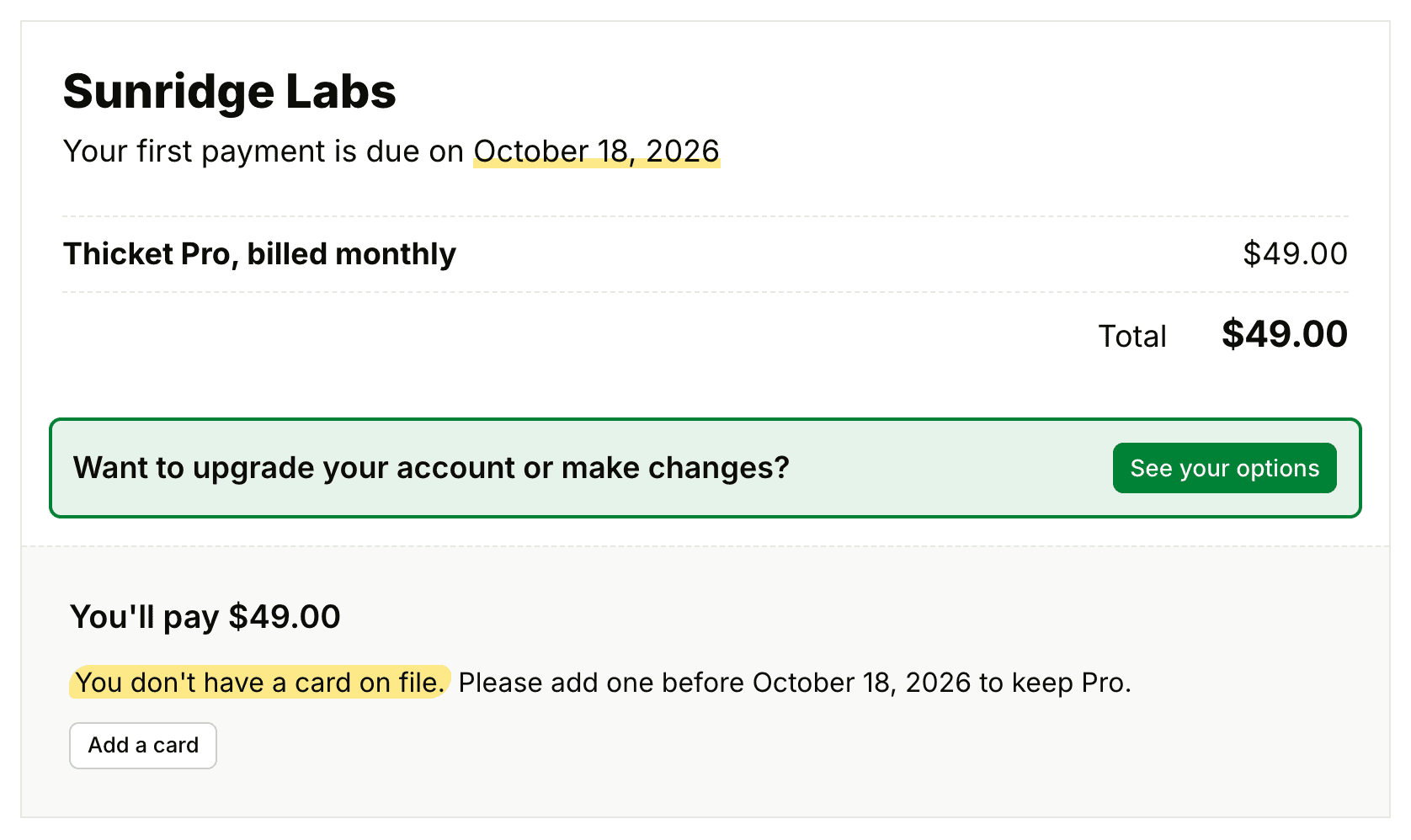
On Free, Starter and the trial, Admin opens with a summary of your plan: what it includes and how much is left. An account on Free that has never paid has no invoice, so Admin > Billing takes it straight to the Plans page.
Choosing a Paid Plan
Upgrading happens on the Plans page. The Upgrade now and See upgrade options links on Home, in the ⌘J menu and on Admin all lead there, and so does See your options on Admin > Billing.
On the Free plan, the page lists your current plan, Starter and Pro, with the plan that fits your account already selected.
- Pick Starter or Pro on the left. The right side shows its price and everything it includes.
- Choose Billed monthly or Billed yearly, then click Upgrade my account.
- Read the sentence above Buy Thicket: it says what you'll pay and when.
- Click Buy Thicket, then enter your card on Stripe's secure checkout page.
When it's done, you're back on Home and the upgrade is in place. Stripe's billing email for the account (the person who entered the card) gets a Thanks for upgrading email that names the plan and says what you'll pay, with which card, and when.
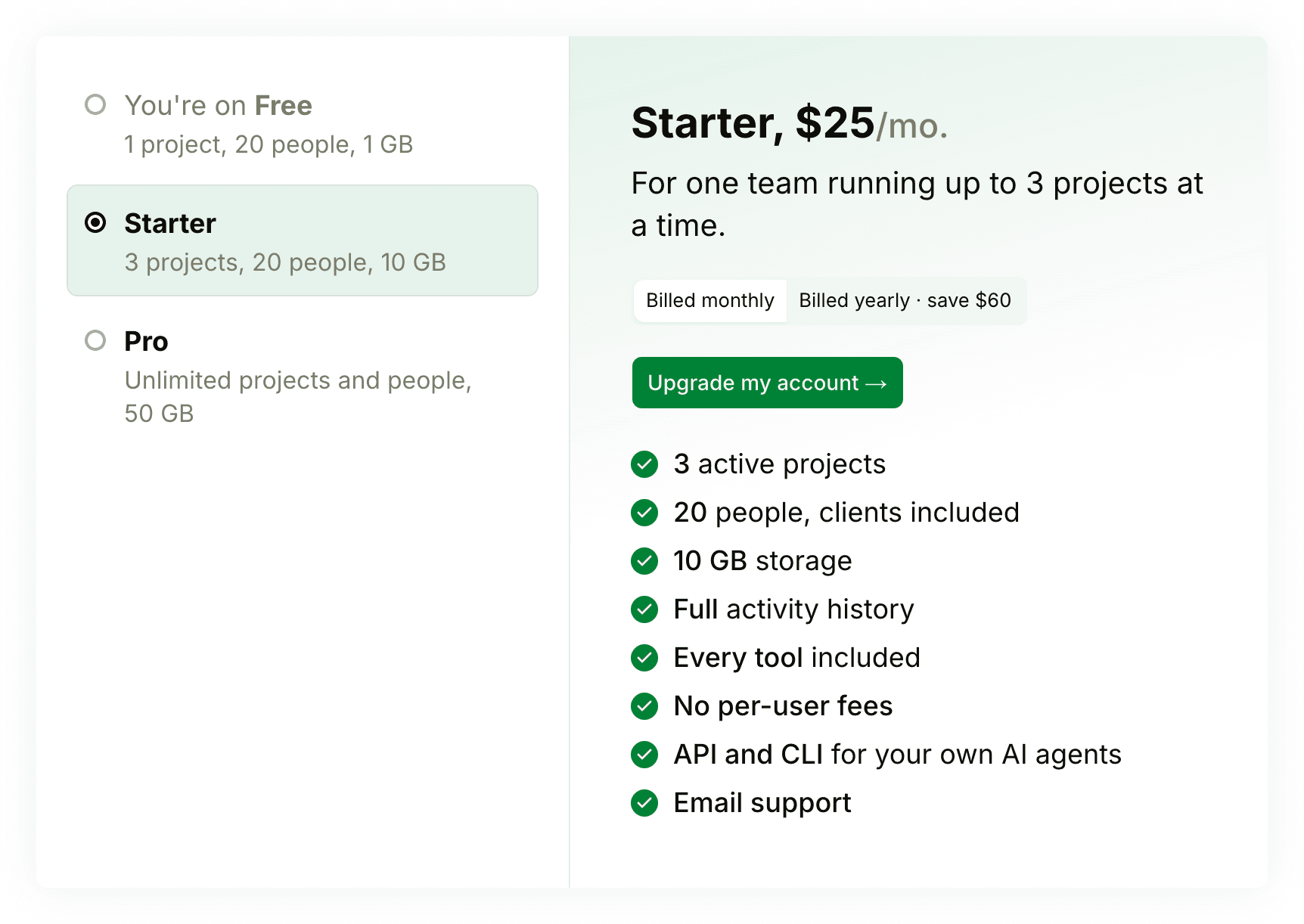
During the free trial, the page opens on Pro, ready to buy: the sentence above Buy Thicket gives the amount and the day the trial ends, when you first pay. See other plans shows Starter, with a Downgrade my account button, and says how many projects would be archived if your account has more active projects than Starter's 3.
Changing or Managing Your Subscription
Once you're subscribed:
- Update your card on the Billing page opens Stripe's billing portal, where you can change the card, and Change next to the invoice email changes where invoices go.
- See your options opens the Plans page, where you can switch between Starter and Pro, or between monthly and yearly billing. Pick the plan and how you want to pay, then click Upgrade my account or Downgrade my account. The change applies to your existing subscription right away, and Stripe prorates the difference on your next invoice.
You can move from Pro to Starter while you have more than 3 active projects. Afterwards, Home asks an owner or admin to choose which projects stay active, and the rest are archived. Archived projects stay readable and can be restored after you upgrade again.
The Free Trial
An organization created on thickethq.com starts with a 30-day free Pro trial, and no card is needed. If you chose Start on Free when you signed up, it starts on the Free plan instead, as an organization created in the Thicket app for iPhone or iPad does. An organization that starts on Free doesn't get a trial later: choosing a paid plan starts billing that day.
- Home and the ⌘J menu show owners the day the trial ends from its first day, and count down the days left in the last 3. Admin shows how many days are left.
- Subscribing during the trial doesn't cut it short: the trial keeps its end date, and you first pay then. In the trial's last two days, you pay at checkout instead. The sentence above Buy Thicket always says which applies.
- Near the end of the trial, Thicket sends a reminder. If you've subscribed, the billing contact hears when the first payment is due, three days before it. If you haven't, the account's first owner hears four days before the end which plan fits your team's projects and people, that you won't pay anything unless you choose one, and what happens if you do nothing.
When the Trial Ends
If nobody subscribes, the organization pauses when the trial ends, and the account's first owner gets an email saying so. Everything in it is kept exactly as it was, but no one can use it until an owner chooses a plan.
- Every page of the organization shows one page instead. Owners see Starter, when it holds everything in the account, and Pro, and go on to checkout from there. Everyone else sees that the organization is paused and that an owner can reopen it.
- From the same page, owners can take one more week of the trial, free, once. They can also export the account's data or cancel the account.
- The Thicket apps, the API and connected AI tools can't open the organization while it's paused. Thicket sends no notifications or digests for it.
- Choosing a plan reopens the organization at once, for everyone, right where it left off.
- An organization that stays paused for six months is closed, and the account's first owner gets an email two weeks before. Every owner gets an email when it closes. Closing works like cancelling: see Cancelling Your Account.
A trial that started before trials paused at their end still ends on the Free plan, as it promised when it began. The reminder email four days before the end says which applies. See Thicket for Free.
If a Payment Fails
If a payment is declined, the status badge on Admin > Billing changes to past due, and Thicket emails the billing contact to say that no money was taken and when the card will be tried again. To fix it, click Update your card on Admin > Billing.
Stopping Payments
To stop paying but keep everything, go to Admin > Cancel account and click Switch to the Free plan. Your subscription runs to the end of the period you've paid for, then the account moves to Free. Cancelling the account itself is a separate step that deletes everything: see Cancelling Your Account. Refunds follow the refund policy.
Discounts
Thicket is free for teachers and students using it for classroom work, and registered 501(c)(3) organizations and CRA registered charities get 10% off any plan. See thickethq.com/discounts for who qualifies and how to apply. An approved education account shows a Comped badge on its billing page, with every Pro feature included.